Picture this… It's Wednesday afternoon. You open LinkedIn, ready to send connection requests to the list of prospects you spent an hour building yesterday.
And then you get hit with: "You've reached the weekly invitation limit."
If you're serious about LinkedIn prospecting, you probably know this feeling. LinkedIn caps most users at 50-200 connection requests per week (depending on your account type and account health), and those can disappear quickly if you’re not careful.
But here's some good news… connection requests aren't the only way to get prospects to notice you on LinkedIn. In fact, there's a strategy that doesn't use ANY connection requests at all.
Everything you need to know about LinkedIn connection requests:
Depending on your account type and account health, LinkedIn will grant you a certain number of connection requests to send out each week. Generally speaking, free accounts get 50/week, while paid accounts (Premium, Sales Navigator, and Recruiter) get 150-200/week.
If you’re getting a different number, it’s probably due to the health of your LinkedIn account. If your acceptance rates are high, for example, LinkedIn is likely to increase your limit because it deems you to be a real person trying to connect with other people in your industry.
If your acceptance rates are low, it gives LinkedIn the impression that you’re sending untargeted requests to anybody and everybody, which can be viewed as “bot-like” activity. As a result, you’ll probably see your limits decrease.
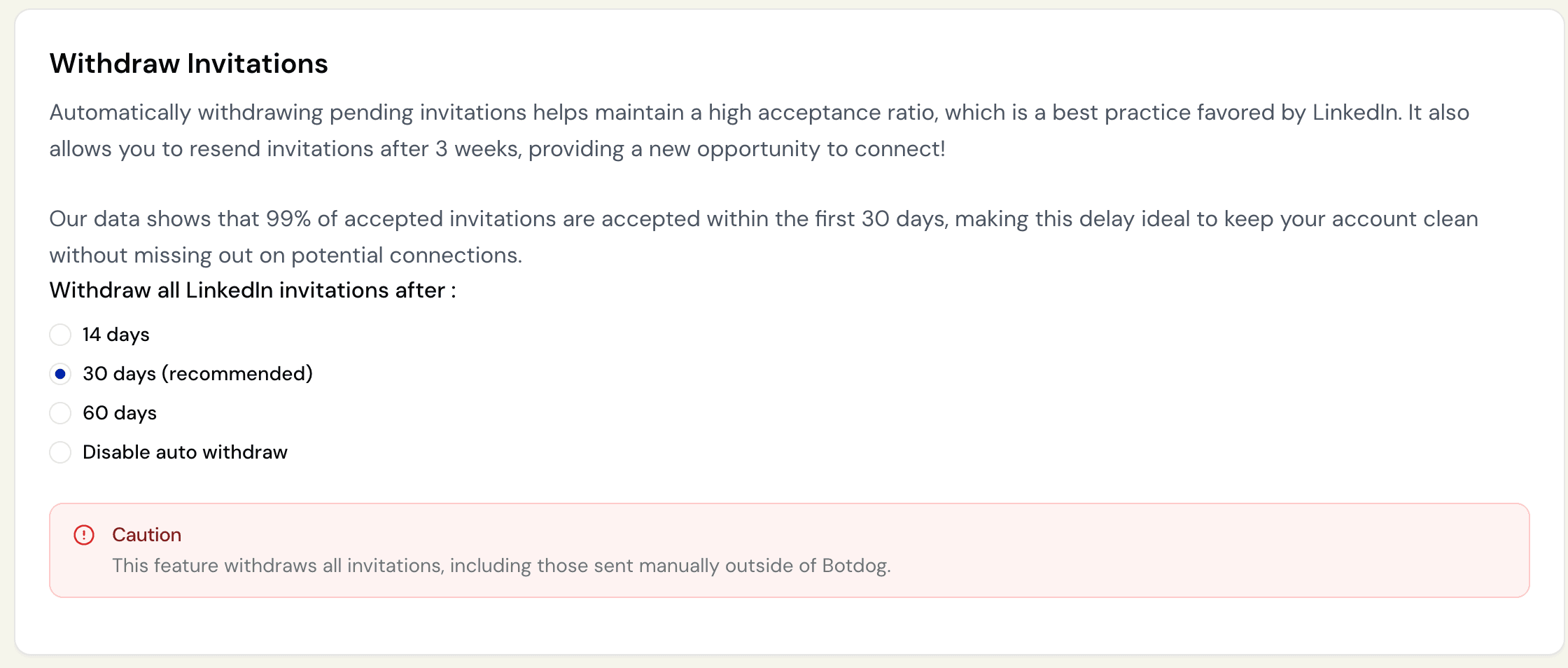
Pending requests can also influence your account health. If you have 500+ pending requests, you’ll likely see lower limits. That’s why we created the auto-withdraw feature for Botdog customers. Whether you send your requests manually or through Botdog, they’ll automatically be withdrawn after 14, 30, or 60 days (you choose). Then, after 3 weeks, you can resend them to the same prospects if you like.
LinkedIn's weekly connection limit resets exactly 7 days after you send your first invitation, so if you send your first request on Monday at 9am, you’ll have to wait until the following Monday at 9am to start sending again.
For salespeople who are actively prospecting on LinkedIn, the connection request limit can create real problems:
- It limits the number of prospects you can reach out to via LinkedIn every week.
- It’s hard to pivot - if you find a hot lead but have already hit your limits, you’ll have to wait.
- It forces you to prioritize and make trade-offs. Should you connect with a VP who’s a perfect ICP fit, or the Manager who might respond faster?
The profile visit strategy (how to get prospects to come to you)
This strategy can be used in two ways:
When you've run out of connection requests.
Alongside your existing outreach strategy.
It’s pretty straightforward - instead of sending outbound connection requests, you systematically visit prospects’ profiles. That’s it.
When you view a prospect’s profile, they get a notification (assuming they’re not in private mode). Most people, especially those who are active on LinkedIn, will be curious about who’s looking at their profile, so they’ll probably end up:
- Visiting your profile
- Judging you (pretty hard)
- Sending you a connection request (if your profile impresses them)
If you visit 100 of your prospects’ profiles every week, you could generate 10-15 inbound connection requests without using a single request from your weekly quota.
The psychology behind this strategy
- Reciprocity: When someone visits your profile, you feel obligated to check theirs. It's the LinkedIn equivalent of someone waving at you across a room - you wave back.
- Curiosity: "Who is this person and why are they looking at my profile?" Most people can't resist clicking through to find out.
- Authority signaling: A profile visit from someone with a strong profile signals "this person is successful and interested in me." That's flattering.
- Lower pressure: Unlike connection requests (which require a yes/no decision), profile visits are passive. There's no rejection involved, which makes people more comfortable exploring who you are.
How to set up a profile visit campaign
Step 1: build your target list
Previously withdrawn requests: If you've already sent a connection request that went unanswered for 30+ days and withdrew it, profile visits offer a low-pressure second chance. These prospects saw your name once before, so a profile visit feels less aggressive than another direct request.
High-value prospects who prefer to be in control: C-level executives, founders, and senior decision-makers often ignore connection requests from people they don't recognize. But when they see someone interesting visit their profile, they'll investigate. Profile visits let them feel like they're in control of the interaction - they decide whether to connect, not you.
Active LinkedIn users (posted in the last 30 days): Check if prospects have posted or commented recently. Active users see profile visit notifications immediately and actually care who's viewing their profile. Inactive users might not log in for weeks, which makes profile visits pointless.
Prospects in competitive industries: If you're targeting people who get bombarded with connection requests daily (recruiters, sales leaders, marketing directors), profile visits help you stand out. While their inbox is flooded with generic requests, a strategic profile visit signals genuine interest without adding to the noise.
Cold prospects with strong mutual connections: If you share 5+ mutual connections with someone but don't have a warm introduction path, profile visits create familiarity before you eventually request to connect. After 2-3 visits, you're no longer a stranger when that connection request finally arrives.
Step 2: Import your prospects (or build a list manually)
Open Botdog and create a new campaign. You can import prospects from LinkedIn search results, Sales Navigator lists, event attendees, or even people who liked or commented on a specific post. Just paste the URL from your LinkedIn search or list, and Botdog extracts all the profiles for you.
If you’re on our Professional + AI tier, you could also use AI Lead Review to double-check that every profile meets your criteria before it gets added to the campaign.
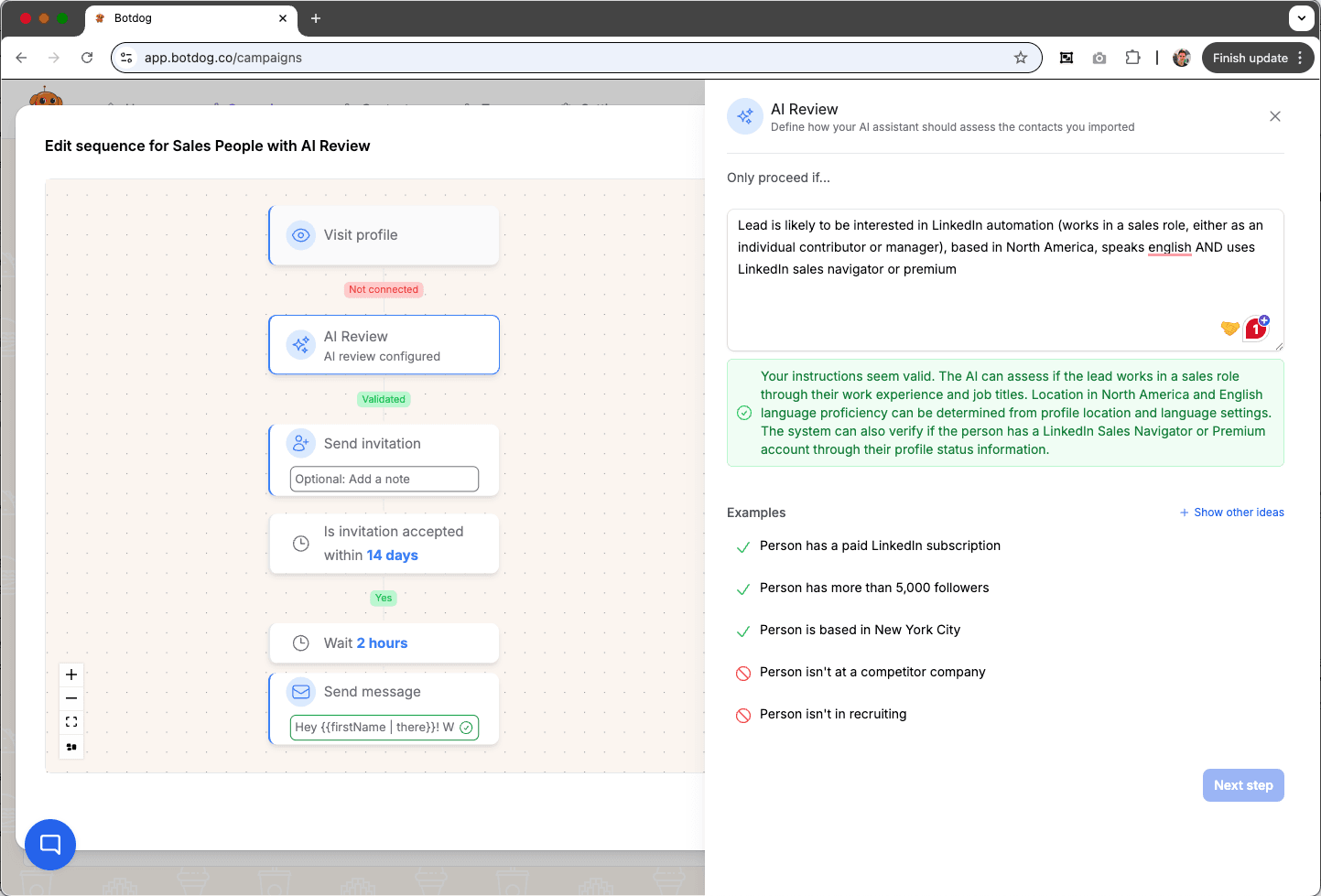
If you're not using automation, create a spreadsheet with everyone’s LinkedIn URLs. Track when you visited each profile so you can space out follow-up visits.
Step 3: Optimize your profile
Before you start visiting profiles, make sure your profile is worth visiting back. When prospects click through to see who viewed their profile, your profile needs to instantly communicate what you do (clear headline), why you're credible (social proof in your About section), and who you help (specific target audience mentioned).
If your profile looks incomplete, generic, or spammy, profile visits won’t work. Prospects will see you as noise, not opportunity. Spend 30 minutes cleaning up your headline and About section before launching any profile visit campaigns. Also, make sure your headshot is professional and relatable by using a style that matches your personality.
Step 4: Create your sequence
In Botdog, set up a sequence like this:
- Day 1: Visit profile
- Day 5: Wait 4 days, visit again
- Day 11: Wait 6 days, visit again
- Day 18: Wait 7 days, visit again
Day 26: Wait 8 days, visit again
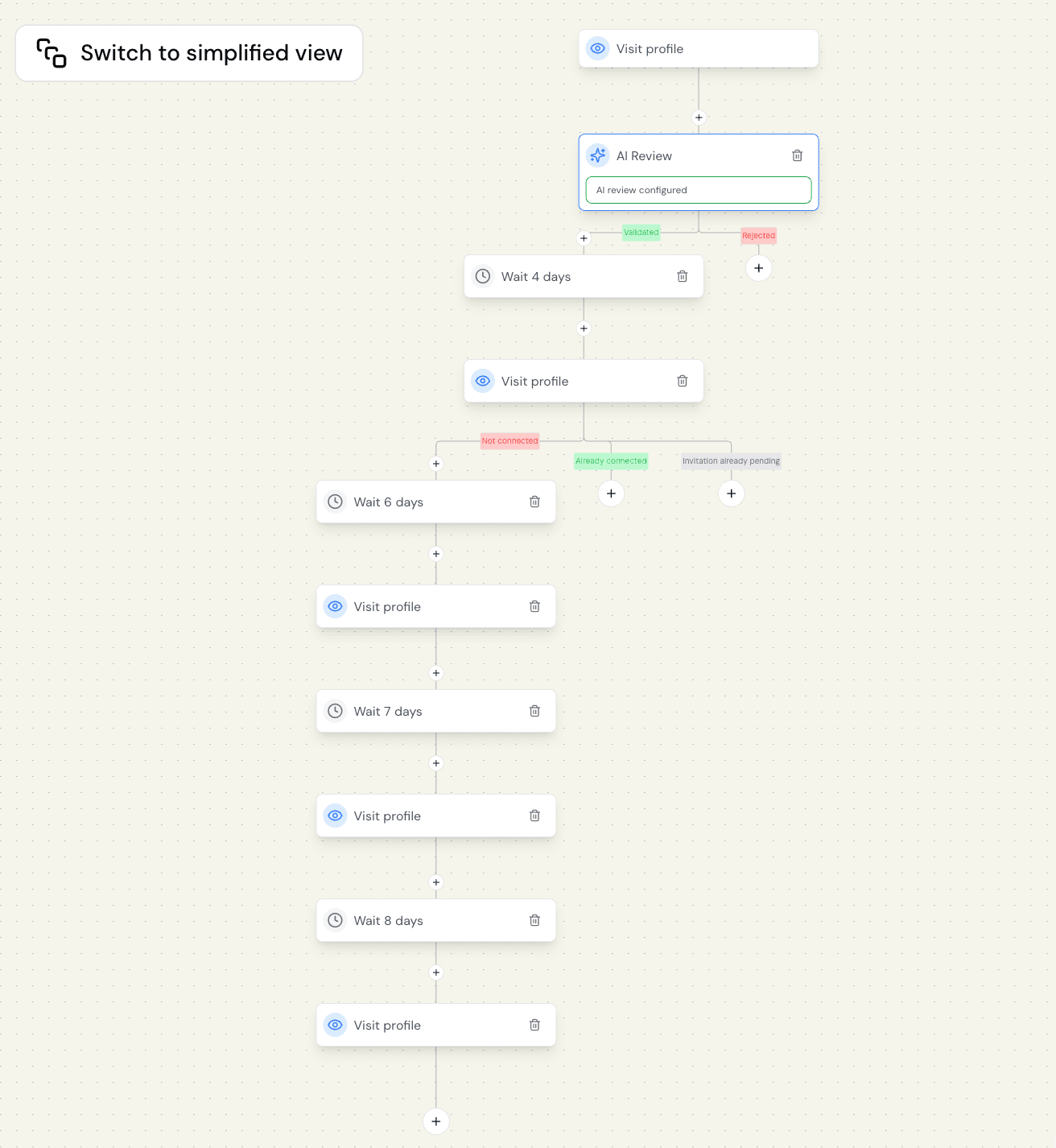
It takes less than 3 minutes to set up this Botdog campaign.
The varying intervals are intentional because a fixed 7-day gap looks a bit robotic. You can customize these intervals based on your preference. Some users prefer tighter spacing early on (3-5 days) to build momentum, then wider gaps (7-10 days) for long-term nurturing.
Botdog automatically spaces profile visits throughout the day to mimic human behavior - some in the morning, some at lunch, some in the evening - just like a real person would browse LinkedIn. This is one of our safety features that protects your account from restrictions or bans.
Step 5: Let it run and monitor inbound requests
Once your campaign is live, Botdog handles the profile visits automatically so you can focus on conversations. Check your LinkedIn notifications to see who visited your profile back or sent you a connection request. As soon as someone in your campaign becomes a 1st degree connection, the campaign will automatically stop for that person.
Step 6: Combine with connection requests later
Profile visits can also work as part of a multi-touch strategy. After 3-4 profile visits, if a prospect still hasn't engaged, consider sending them a connection request. At that point, they've seen your name multiple times, which could boost the chances of them accepting.
In Botdog, you can build this directly into your sequence:
- Days 1-26: Profile visits only (5 visits with varied spacing)
- Day 33: If they haven't connected, send a connection request
- Day 40: If they accept, send your first message
Common mistakes to avoid
- Visiting too frequently: Don't visit the same profile every day. That's creepy, not strategic. Space visits 4-9 days apart with varied intervals.
- Poor profile optimization: If your profile doesn't clearly communicate value, profile visits waste time. Fix your headline and About section before starting campaigns.
- Random targeting: Visiting profiles outside your ICP dilutes results. Only visit prospects who could actually benefit from connecting with you.
- No follow-up strategy: Profile visits alone don't close deals. Have a plan for what happens when prospects engage.
- Ignoring inbound requests: When prospects send you connection requests after profile visits, try to respond within 24 hours. That's a hot lead raising their hand.
Other strategies to use when you're out of connection requests
Profile visits are the most effective workaround, but here are some other tactics to help you stay productive when your connection quota is exhausted:
- Engage with their content: Leave thoughtful comments (15+ words) on prospects' posts. When they see your name in their notifications, they might check your profile and send a connection request.
- Join LinkedIn groups: Members of the same LinkedIn group can message each other without being connected. Find groups where your prospects hang out, join them, and start conversations.
- Use InMail credits: If you have LinkedIn Premium or Sales Navigator, you can send InMails to prospects without connecting first. These messages land in their primary inbox, not the message request folder.
- Focus on your existing network: While you're waiting for your connection limit to reset, nurture the connections you already have. Send follow-up messages and share valuable content to turn existing connections into warmer relationships.
The bottom line…
Running out of LinkedIn connection requests is frustrating, but it doesn't have to stop you from prospecting. Our profile visit strategy is a strategic alternative that doesn’t count against your weekly connection limit. It can generate inbound interest from prospects, warm up cold outreach before you send requests, and work continuously in the background while you focus on conversations.
Ready to maximize your LinkedIn outreach? Try Botdog for free for 7 days and set up your first campaign in less than 3 minutes.