Message variations in tabs, and a new "Rewrite with AI" button
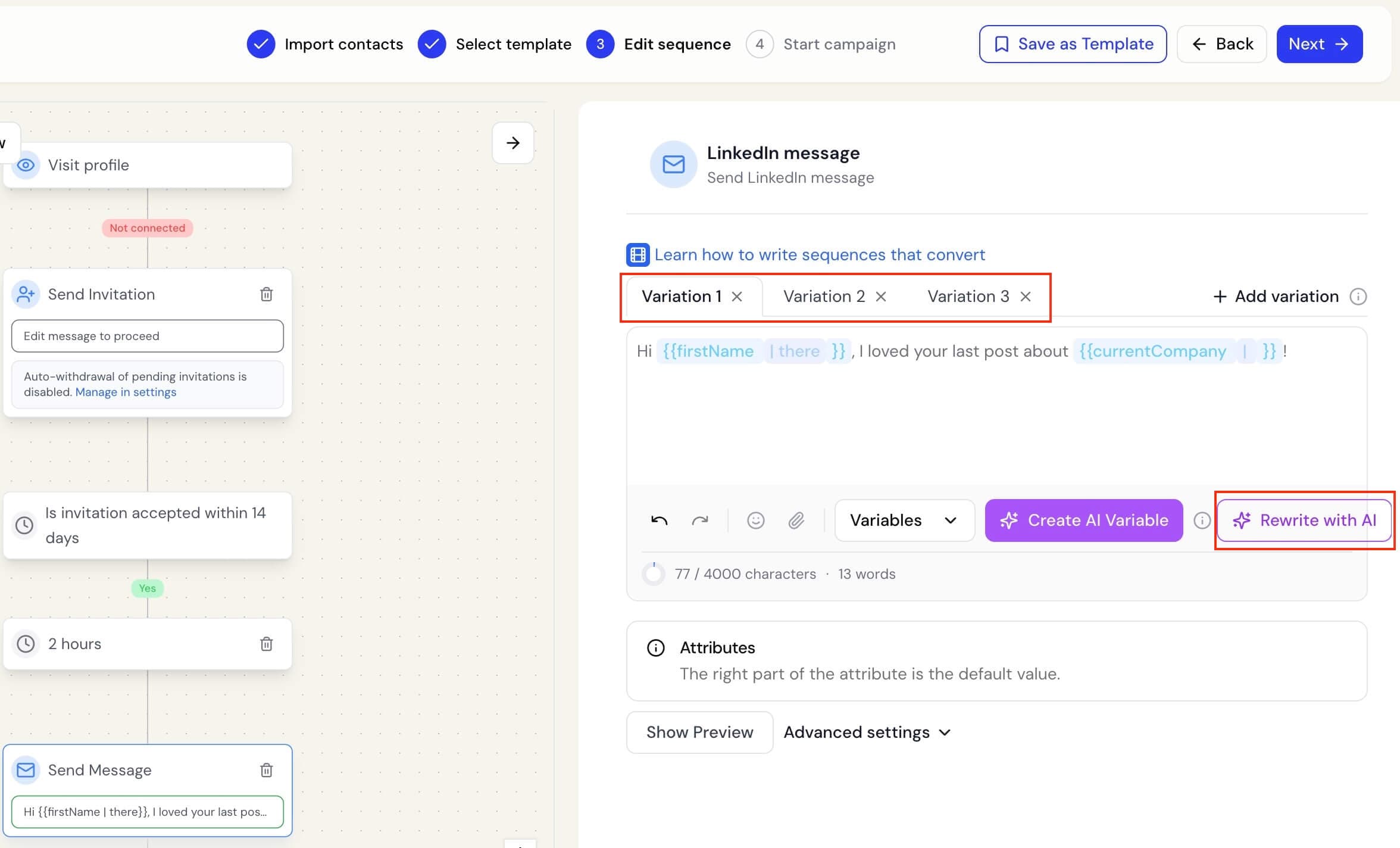
Writing and refining campaign messages is now cleaner and faster.
Message variations now use tabs
Previously, every variation of a LinkedIn message, InMail, or connection note appeared one below another. With several versions, that meant a lot of scrolling.
Now, each variation has its own tab.
You can:
- Select Add variation to create a new version, up to 4 per step
- Switch between versions by clicking their tabs
- Remove a variation using the x on its tab
- Use Show Preview to preview the variation you are currently editing
When you add a new variation, it opens immediately so you can start writing.
Rewrite your message with AI
Once you have written a LinkedIn message, InMail, or connection note, a new Rewrite with AI button appears.
Botdog suggests a clearer, more natural version of your draft without changing your original until you approve it.
You can choose:
- Accept to replace your draft with the suggestion
- Try again to generate another version
- Discard to keep your original message
Your personalisation variables, such as first name or company, are always preserved exactly as you wrote them.
Botdog also keeps the rewritten message within the allowed character limit.
Rewrite with AI is available on the Professional AI plan.
Clearer message counts
The character and word count now appears on its own line below the editor, making it easier to read while you write.