Webhooks: Messages Sent From Your Inbox, and No More Duplicate Replies
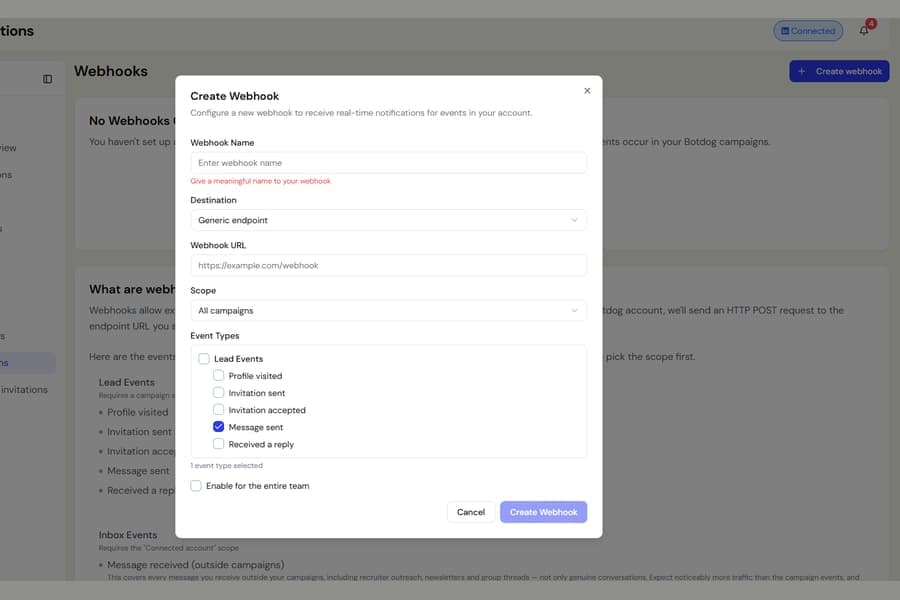
You can now send a webhook whenever you manually send a message from the Botdog inbox.
Previously, the Message sent webhook only covered messages sent by campaigns. Replies you typed yourself, or new conversations you started from the inbox, were not passed to your connected tools.
How to turn it on
Go to:
Settings > Integrations > Webhooks
Create or edit a webhook, then:
- Choose Connected account as the scope
- Turn on Message sent (from inbox)
The event fires whenever you send a message from the Botdog inbox, including messages to people who are already part of your campaigns.
Campaign messages still use the existing Message sent webhook event, so the same message will not be sent twice.
Messages you send directly from the LinkedIn website or app are not included.
Duplicate reply webhooks are fixed too
We also fixed an issue where one reply could be sent to your webhook several times if the same person was a lead in more than one campaign.
Each reply is now delivered once, linked to the campaign that owns the conversation.
If your webhook only covers specific campaigns, Botdog still makes sure the reply is delivered when it belongs to one of those campaigns, so relevant events are not missed.