Pending invitations, cleaned up automatically
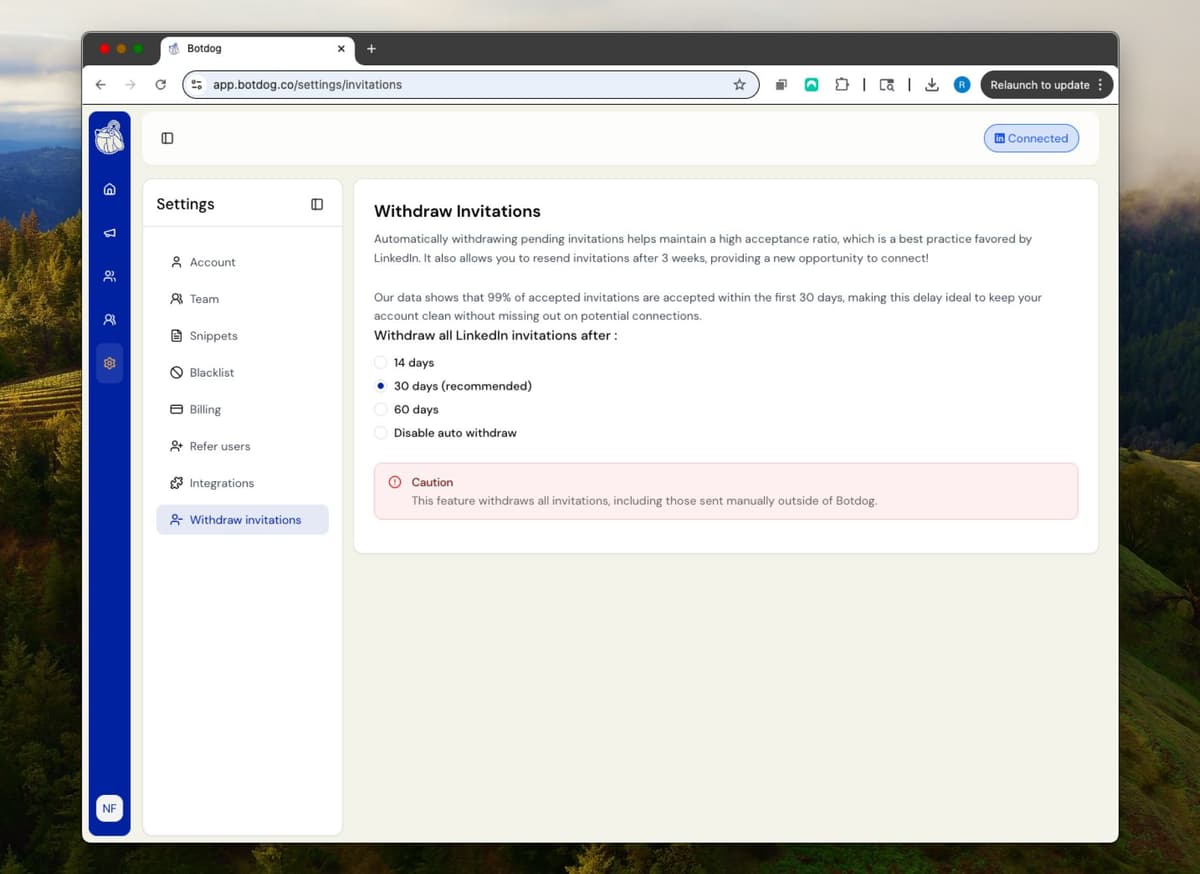
Hundreds of ignored connection requests sitting in "Sent" is bad for your acceptance rate and bad for how LinkedIn sees your account. Botdog withdraws pending invitations after 30 days by default, or any window from 1 to 91 days you choose, including the ones you sent by hand, and gives you a Sent Invitations page to withdraw the rest yourself.
See the Difference
Let the old invites go
- ✕
A pile of pending
800 unanswered invitations from the last year, dragging down your ratio.
- ✕
Manual clean-up
Clicking "Withdraw" one at a time on LinkedIn's slowest page.
- ✕
No visibility
No idea who was withdrawn, when, or whether they're worth another try.
- ✓
Set the window once
30 days by default; make it 14 or 60 if you prefer. Botdog does the rest, daily.
- ✓
Manual invitations included
Invitations you sent yourself on LinkedIn get withdrawn too.
- ✓
See it in your contacts
A Withdrawn filter and a Withdrawal Date column, so you can re-approach the right people later.
Ready to transform your LinkedIn workflow?
Start Your 7-Day Free TrialNo credit card required • Cancel anytime
Withdraw With Precision
Your window, your rule
Choose anywhere from 1 to 91 days. The "Send invitation" step in every campaign shows you the current setting so there are no surprises.
A proper Sent Invitations page
Search by name, sort oldest-first, filter by age (14–30, 30–60, 60+ days) and bulk-withdraw exactly the ones you pick.
Withdrawn ≠ lost
Withdrawn contacts keep their history. Filter to them on the Contacts page, start a new campaign, or export them.
What people say about Botdog
Real stories. Real results.

Kate G.

I like that Botdog is very intuitive, making it easy even for someone who has never used it before or read any instructions to use it immediately. The initial setup was extremely easy, and it's well integrated with our other tools. It saves an enormous amount of time by automating LinkedIn outreach, allowing my sales team to take over only when a lead replies.

Valentin S.

Siva D.
Kathy L.
I like how easy it is to import and automate the request addition in Botdog. It's a simple search on the system and adding the link to Botdog is as simple as it gets. The initial setup was very simple; I just created a username and connected LinkedIn.
Mohamed A.
Botdog is straightforward and easy to use. It helps me get the tasks I need done - fast and without friction. I use it for product and service discovery, and it consistently leads me to insightful conversations with potential customers every week. It is still quite cheap in comparison with other tools.

Kamil J.
Toni H.
🚀 𝐈𝐟 𝐈 𝐖𝐞𝐫𝐞 𝐒𝐭𝐚𝐫𝐭𝐢𝐧𝐠 𝐌𝐲 𝐁𝐮𝐬𝐢𝐧𝐞𝐬𝐬 𝐓𝐨𝐝𝐚𝐲, I’d Skip Manual LinkedIn Engagement and Head Straight to 𝐁𝐨𝐭𝐝𝐨𝐠 💡

Eldad Stinbook
Cloud Evangelist | Infrastructu…
I subscribed -- in the seven-day free trial, I got several meetings booked. Much better response rate than my LinkedIn Sales Nav InMessages.

Greg Miller
Awesome team! Switching to bot dog - I've been using Dripify and it's wayyy too expensive for the value it provides.

Rasmus Chow
Botdog has completely changed how I approach LinkedIn outreach. I went from sending 10 connections a day manually to 100+ automated, and my response rate actually went up.
Sarah Johnson
VP Sales | SaaS
Best LinkedIn automation tool I've tried. Simple to set up, doesn't get your account flagged, and the team support is fantastic. Worth every penny.
Marco Bianchi
Founder | Agency
Kate G.
I like that Botdog is very intuitive, making it easy even for someone who has never used it before or read any instructions to use it immediately. The initial setup was extremely easy, and it's well integrated with our other tools. It saves an enormous amount of time by automating LinkedIn outreach, allowing my sales team to take over only when a lead replies.
Valentin S.
Siva D.
Kathy L.
I like how easy it is to import and automate the request addition in Botdog. It's a simple search on the system and adding the link to Botdog is as simple as it gets. The initial setup was very simple; I just created a username and connected LinkedIn.
Mohamed A.
Botdog is straightforward and easy to use. It helps me get the tasks I need done - fast and without friction. I use it for product and service discovery, and it consistently leads me to insightful conversations with potential customers every week. It is still quite cheap in comparison with other tools.
Kamil J.
Toni H.
🚀 𝐈𝐟 𝐈 𝐖𝐞𝐫𝐞 𝐒𝐭𝐚𝐫𝐭𝐢𝐧𝐠 𝐌𝐲 𝐁𝐮𝐬𝐢𝐧𝐞𝐬𝐬 𝐓𝐨𝐝𝐚𝐲, I’d Skip Manual LinkedIn Engagement and Head Straight to 𝐁𝐨𝐭𝐝𝐨𝐠 💡
Eldad Stinbook
Cloud Evangelist | Infrastructu…
I subscribed -- in the seven-day free trial, I got several meetings booked. Much better response rate than my LinkedIn Sales Nav InMessages.
Greg Miller
Awesome team! Switching to bot dog - I've been using Dripify and it's wayyy too expensive for the value it provides.
Rasmus Chow
Botdog has completely changed how I approach LinkedIn outreach. I went from sending 10 connections a day manually to 100+ automated, and my response rate actually went up.
Sarah Johnson
VP Sales | SaaS
Best LinkedIn automation tool I've tried. Simple to set up, doesn't get your account flagged, and the team support is fantastic. Worth every penny.
Marco Bianchi
Founder | Agency
Frequently Asked Questions About Auto-withdraw
Get answers to common questions about this Botdog feature
Botdog's auto-withdraw feature is enabled by default and automatically withdraws pending invitations after your chosen time period. You can select 14 days, 30 days, or 60 days, or turn it off completely. This helps you avoid cluttering your pending invitation list and allows you to re-invite people in future campaigns (once an invitation is removed, you can re-send an invitation after 30 days, and the conversion rate is about the same).
No, auto-withdraw is configured at the account level and applies equally to all your campaigns. You cannot set different withdrawal times per campaign. You can choose from three timing options: 14 days, 30 days, or 60 days.
Yes, auto-withdraw works on all pending invitations including ones you sent manually outside of Botdog. This helps keep your entire LinkedIn invitation queue clean across all your outreach activities.
Withdrawing old pending invitations allows you to re-invite the same person after 30 days, giving you a second chance with prospects who ignored your first request. The conversion rate for re-invitations is about the same as first-time invites. It also may help optimize your weekly invitation quota on LinkedIn.
Botdog offers three auto-withdraw timing options: 14 days, 30 days, or 60 days after sending the invitation. Most users choose 30 days as it balances giving prospects time to respond while keeping your pending queue fresh. Our data shows 99% of invitations are accepted within a 30-day timeframe, so 30 days is probably the best choice.
Ready to Make the Jump?
Join thousands of professionals who are growing their network on autopilot. Start your journey today with our 7-day free trial.
Trusted by 5,000+ sales professionals worldwide
