How to Export LinkedIn Contacts to CSV with Botdog
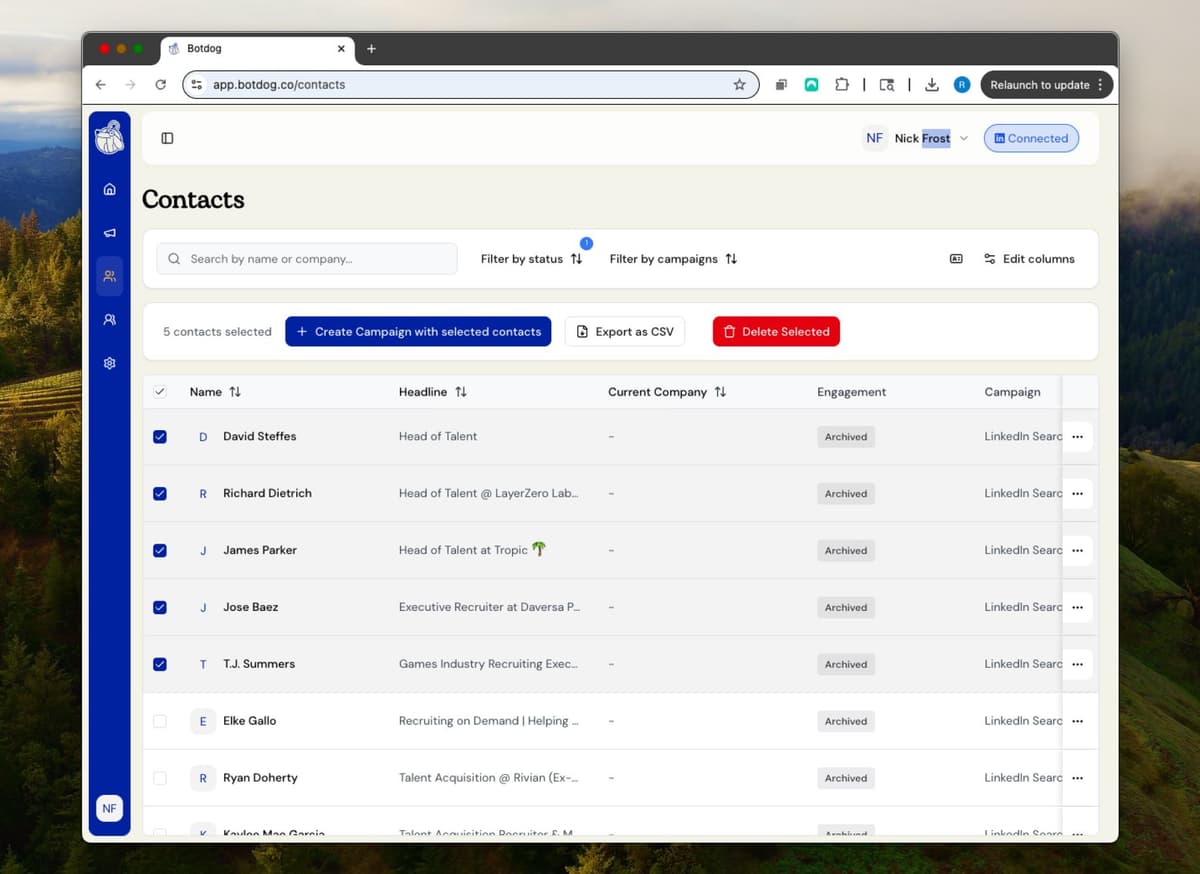
Export contacts from anywhere on LinkedIn - regular searches, Sales Navigator, your connections, company employees, event attendees, and more. Botdog handles all the heavy lifting: automatically extracting profile data, formatting it consistently, and delivering clean CSVs ready for your CRM or campaigns. No more copy-pasting or fighting with LinkedIn's export limits.
See the Difference
Get your LinkedIn data out of LinkedIn
- ✕
Data trapped in LinkedIn
All your valuable connection data locked inside LinkedIn. Can't analyze it or use it in other tools
- ✕
Manual copy-paste nightmare
Copying names, titles, and companies one by one into spreadsheets. Takes hours for hundreds of contacts
- ✕
Can't use your network
No way to segment, filter, or analyze your LinkedIn connections. Can't run outbound campaigns in other tools
- ✓
Export instantly to CSV
Copy any LinkedIn search URL and paste into Botdog. Get a CSV with all the data in seconds
- ✓
Enrich with emails
Use Botdog's waterfall enrichment through 15+ providers to find email addresses. Run outbound campaigns in any tool
- ✓
Your data is portable
Never locked into LinkedIn. Export anytime, analyze in Excel, or build segmented lists for multi-channel outreach
Ready to transform your LinkedIn workflow?
Start Your 7-Day Free TrialNo credit card required • Cancel anytime
Every Lead, Every Format
Works Everywhere
Export from any LinkedIn page or view - regular searches, Sales Navigator leads, your connections, company employees, event attendees, group members, and more. If you can see it on LinkedIn, Botdog can export it.
Rich Profile Data
Get complete contact information including names, titles, companies, and more. Every export is perfectly formatted and ready for your CRM, email campaigns, or analysis.
Export on Autopilot
Schedule regular exports of your saved searches and get notified when your results are ready.
What people say about Botdog
Real stories. Real results.

Kate G.

I like that Botdog is very intuitive, making it easy even for someone who has never used it before or read any instructions to use it immediately. The initial setup was extremely easy, and it's well integrated with our other tools. It saves an enormous amount of time by automating LinkedIn outreach, allowing my sales team to take over only when a lead replies.

Valentin S.

Siva D.
Kathy L.
I like how easy it is to import and automate the request addition in Botdog. It's a simple search on the system and adding the link to Botdog is as simple as it gets. The initial setup was very simple; I just created a username and connected LinkedIn.
Mohamed A.
Botdog is straightforward and easy to use. It helps me get the tasks I need done - fast and without friction. I use it for product and service discovery, and it consistently leads me to insightful conversations with potential customers every week. It is still quite cheap in comparison with other tools.

Kamil J.
Toni H.
🚀 𝐈𝐟 𝐈 𝐖𝐞𝐫𝐞 𝐒𝐭𝐚𝐫𝐭𝐢𝐧𝐠 𝐌𝐲 𝐁𝐮𝐬𝐢𝐧𝐞𝐬𝐬 𝐓𝐨𝐝𝐚𝐲, I’d Skip Manual LinkedIn Engagement and Head Straight to 𝐁𝐨𝐭𝐝𝐨𝐠 💡

Eldad Stinbook
Cloud Evangelist | Infrastructu…
I subscribed -- in the seven-day free trial, I got several meetings booked. Much better response rate than my LinkedIn Sales Nav InMessages.

Greg Miller
Awesome team! Switching to bot dog - I've been using Dripify and it's wayyy too expensive for the value it provides.

Rasmus Chow
Botdog has completely changed how I approach LinkedIn outreach. I went from sending 10 connections a day manually to 100+ automated, and my response rate actually went up.
Sarah Johnson
VP Sales | SaaS
Best LinkedIn automation tool I've tried. Simple to set up, doesn't get your account flagged, and the team support is fantastic. Worth every penny.
Marco Bianchi
Founder | Agency
Kate G.
I like that Botdog is very intuitive, making it easy even for someone who has never used it before or read any instructions to use it immediately. The initial setup was extremely easy, and it's well integrated with our other tools. It saves an enormous amount of time by automating LinkedIn outreach, allowing my sales team to take over only when a lead replies.
Valentin S.
Siva D.
Kathy L.
I like how easy it is to import and automate the request addition in Botdog. It's a simple search on the system and adding the link to Botdog is as simple as it gets. The initial setup was very simple; I just created a username and connected LinkedIn.
Mohamed A.
Botdog is straightforward and easy to use. It helps me get the tasks I need done - fast and without friction. I use it for product and service discovery, and it consistently leads me to insightful conversations with potential customers every week. It is still quite cheap in comparison with other tools.
Kamil J.
Toni H.
🚀 𝐈𝐟 𝐈 𝐖𝐞𝐫𝐞 𝐒𝐭𝐚𝐫𝐭𝐢𝐧𝐠 𝐌𝐲 𝐁𝐮𝐬𝐢𝐧𝐞𝐬𝐬 𝐓𝐨𝐝𝐚𝐲, I’d Skip Manual LinkedIn Engagement and Head Straight to 𝐁𝐨𝐭𝐝𝐨𝐠 💡
Eldad Stinbook
Cloud Evangelist | Infrastructu…
I subscribed -- in the seven-day free trial, I got several meetings booked. Much better response rate than my LinkedIn Sales Nav InMessages.
Greg Miller
Awesome team! Switching to bot dog - I've been using Dripify and it's wayyy too expensive for the value it provides.
Rasmus Chow
Botdog has completely changed how I approach LinkedIn outreach. I went from sending 10 connections a day manually to 100+ automated, and my response rate actually went up.
Sarah Johnson
VP Sales | SaaS
Best LinkedIn automation tool I've tried. Simple to set up, doesn't get your account flagged, and the team support is fantastic. Worth every penny.
Marco Bianchi
Founder | Agency
Frequently Asked Questions About Export LinkedIn Contacts to CSV
Get answers to common questions about this Botdog feature
Copy and paste any LinkedIn search URL into Botdog to export the results. Get names, titles, companies, LinkedIn URLs, and connection dates in CSV format.
When you export LinkedIn contacts, you'll get names, job titles, companies, LinkedIn profile URLs, and connection dates in CSV format. This works with Excel, Google Sheets, and any CRM.
No, you don't need Sales Navigator to export data. Botdog works with both regular LinkedIn searches and Sales Navigator searches. However, we strongly recommend Premium accounts (Sales Navigator, Recruiter, or Premium) for the best safety and access to more prospects.
Copy any LinkedIn search URL (including "My Connections") and paste it into Botdog to export your connections to CSV. You'll get names, job titles, companies, LinkedIn profile URLs, and connection dates - a complete backup of your network data.
Yes, use Botdog to export your LinkedIn connections to CSV format that works with Excel and Google Sheets. Copy your connections search URL from LinkedIn, paste into Botdog, and download your network data instantly.
Ready to Make the Jump?
Join thousands of professionals who are growing their network on autopilot. Start your journey today with our 7-day free trial.

Trusted by 5,000+ sales professionals worldwide
