One inbox for your whole team's LinkedIn accounts
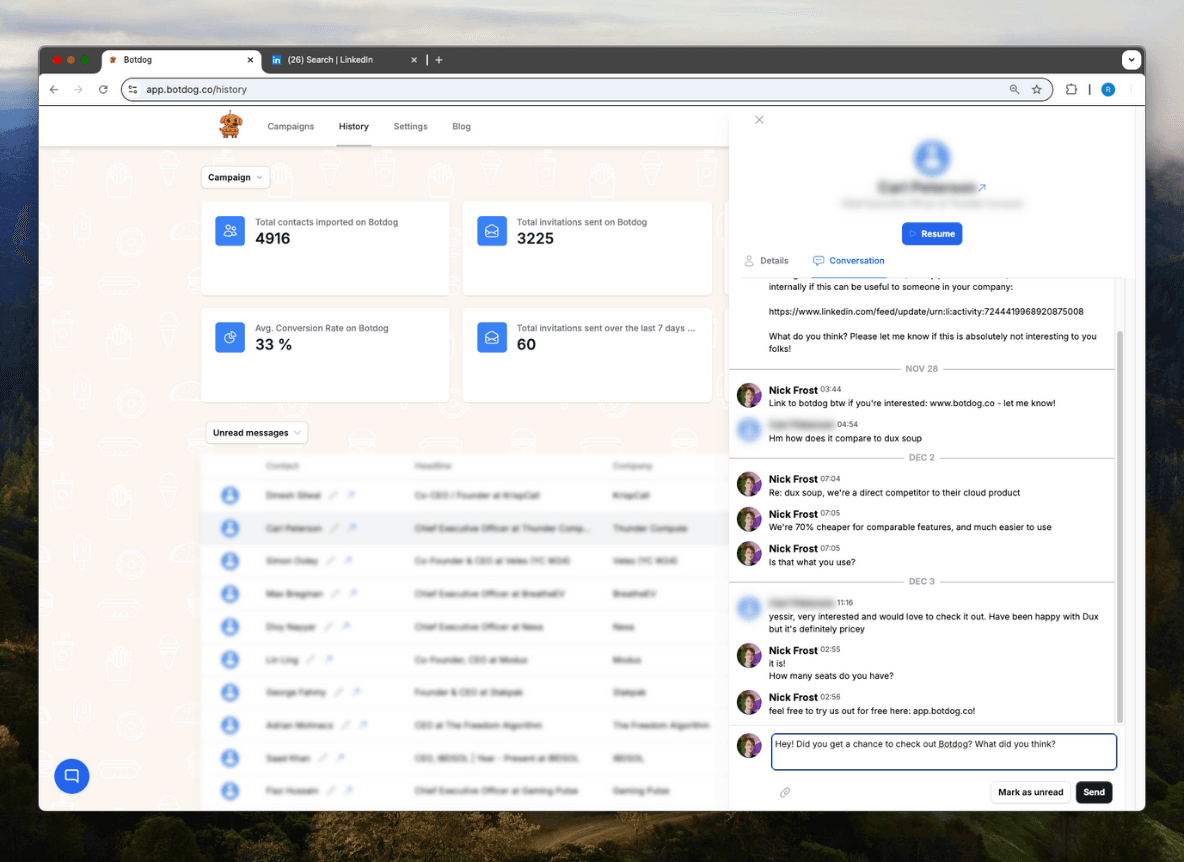
When five people run outreach, replies land in five LinkedIn inboxes and nobody has the full picture. Botdog's team inbox merges conversations from every connected account into one view, lets each person decide exactly who sees their inbox, admins, everyone, or nobody, and lets a manager reply on anyone's behalf without asking for their password.
See the Difference
Manage replies for yourself or your whole team
- ✕
Five inboxes, five logins
A manager who wants to check a teammate's replies asks for a screenshot.
- ✕
Hot leads sit unanswered
A teammate is on holiday; their prospects' replies are invisible to everyone else.
- ✕
All-or-nothing sharing
Either everybody sees everything, or nobody sees anything.
- ✓
All accounts, one list
Every teammate's conversations in one inbox, filterable by sending account, searchable across the whole team.
- ✓
Sharing you control
Two independent settings: share with team admins, share with the rest of the team. Each person sets their own.
- ✓
Reply as anyone
Switch to a teammate's account from the top bar and answer their prospect in their voice.
Ready to transform your LinkedIn workflow?
Start Your 7-Day Free TrialNo credit card required • Cancel anytime
Team-Grade Inbox Controls
Sender filter
Pick one account and the inbox narrows to that person's conversations and opens their latest thread, so your reply is aimed at the right account.
Team-wide search
Search finds every shared conversation you're allowed to see — not just your own.
Owner-level switch
Team owners and admins can turn the Unified Inbox on or off for the whole team while they decide how it fits their workflow.
What people say about Botdog
Real stories. Real results.

Kate G.

I like that Botdog is very intuitive, making it easy even for someone who has never used it before or read any instructions to use it immediately. The initial setup was extremely easy, and it's well integrated with our other tools. It saves an enormous amount of time by automating LinkedIn outreach, allowing my sales team to take over only when a lead replies.

Valentin S.

Siva D.
Kathy L.
I like how easy it is to import and automate the request addition in Botdog. It's a simple search on the system and adding the link to Botdog is as simple as it gets. The initial setup was very simple; I just created a username and connected LinkedIn.
Mohamed A.
Botdog is straightforward and easy to use. It helps me get the tasks I need done - fast and without friction. I use it for product and service discovery, and it consistently leads me to insightful conversations with potential customers every week. It is still quite cheap in comparison with other tools.

Kamil J.
Toni H.
🚀 𝐈𝐟 𝐈 𝐖𝐞𝐫𝐞 𝐒𝐭𝐚𝐫𝐭𝐢𝐧𝐠 𝐌𝐲 𝐁𝐮𝐬𝐢𝐧𝐞𝐬𝐬 𝐓𝐨𝐝𝐚𝐲, I’d Skip Manual LinkedIn Engagement and Head Straight to 𝐁𝐨𝐭𝐝𝐨𝐠 💡

Eldad Stinbook
Cloud Evangelist | Infrastructu…
I subscribed -- in the seven-day free trial, I got several meetings booked. Much better response rate than my LinkedIn Sales Nav InMessages.

Greg Miller
Awesome team! Switching to bot dog - I've been using Dripify and it's wayyy too expensive for the value it provides.

Rasmus Chow
Botdog has completely changed how I approach LinkedIn outreach. I went from sending 10 connections a day manually to 100+ automated, and my response rate actually went up.
Sarah Johnson
VP Sales | SaaS
Best LinkedIn automation tool I've tried. Simple to set up, doesn't get your account flagged, and the team support is fantastic. Worth every penny.
Marco Bianchi
Founder | Agency
Kate G.
I like that Botdog is very intuitive, making it easy even for someone who has never used it before or read any instructions to use it immediately. The initial setup was extremely easy, and it's well integrated with our other tools. It saves an enormous amount of time by automating LinkedIn outreach, allowing my sales team to take over only when a lead replies.
Valentin S.
Siva D.
Kathy L.
I like how easy it is to import and automate the request addition in Botdog. It's a simple search on the system and adding the link to Botdog is as simple as it gets. The initial setup was very simple; I just created a username and connected LinkedIn.
Mohamed A.
Botdog is straightforward and easy to use. It helps me get the tasks I need done - fast and without friction. I use it for product and service discovery, and it consistently leads me to insightful conversations with potential customers every week. It is still quite cheap in comparison with other tools.
Kamil J.
Toni H.
🚀 𝐈𝐟 𝐈 𝐖𝐞𝐫𝐞 𝐒𝐭𝐚𝐫𝐭𝐢𝐧𝐠 𝐌𝐲 𝐁𝐮𝐬𝐢𝐧𝐞𝐬𝐬 𝐓𝐨𝐝𝐚𝐲, I’d Skip Manual LinkedIn Engagement and Head Straight to 𝐁𝐨𝐭𝐝𝐨𝐠 💡
Eldad Stinbook
Cloud Evangelist | Infrastructu…
I subscribed -- in the seven-day free trial, I got several meetings booked. Much better response rate than my LinkedIn Sales Nav InMessages.
Greg Miller
Awesome team! Switching to bot dog - I've been using Dripify and it's wayyy too expensive for the value it provides.
Rasmus Chow
Botdog has completely changed how I approach LinkedIn outreach. I went from sending 10 connections a day manually to 100+ automated, and my response rate actually went up.
Sarah Johnson
VP Sales | SaaS
Best LinkedIn automation tool I've tried. Simple to set up, doesn't get your account flagged, and the team support is fantastic. Worth every penny.
Marco Bianchi
Founder | Agency
Frequently Asked Questions About Team Inbox
Get answers to common questions about this Botdog feature
View and manage all LinkedIn messages sent through Botdog campaigns in one place. These are kept separate from your regular inbox for confidentiality. Only shows Botdog-initiated messages. This helps you stay organized and respond quickly to interested prospects.
Inbox Management shows only Botdog messages in a separate view from your LinkedIn inbox. You can see which campaign generated each conversation to track your outreach effectiveness.
Yes, very safe. This is a management feature that helps you organize conversations - it doesn't send any automated messages or actions. We strongly recommend Premium LinkedIn accounts for overall safety.
Botdog's Inbox Management shows all LinkedIn messages from all your campaigns in one view per account. See which campaign generated each conversation, filter by campaign source, and respond to all interested prospects from a single dashboard instead of jumping between LinkedIn and spreadsheets.
Yes, Inbox Management shows the campaign source for every conversation. This helps you track which campaigns generate the most engagement and understand what messaging resonates best with your prospects.
Ready to Make the Jump?
Join thousands of professionals who are growing their network on autopilot. Start your journey today with our 7-day free trial.

Trusted by 5,000+ sales professionals worldwide
