The moment something happens on LinkedIn, your stack knows
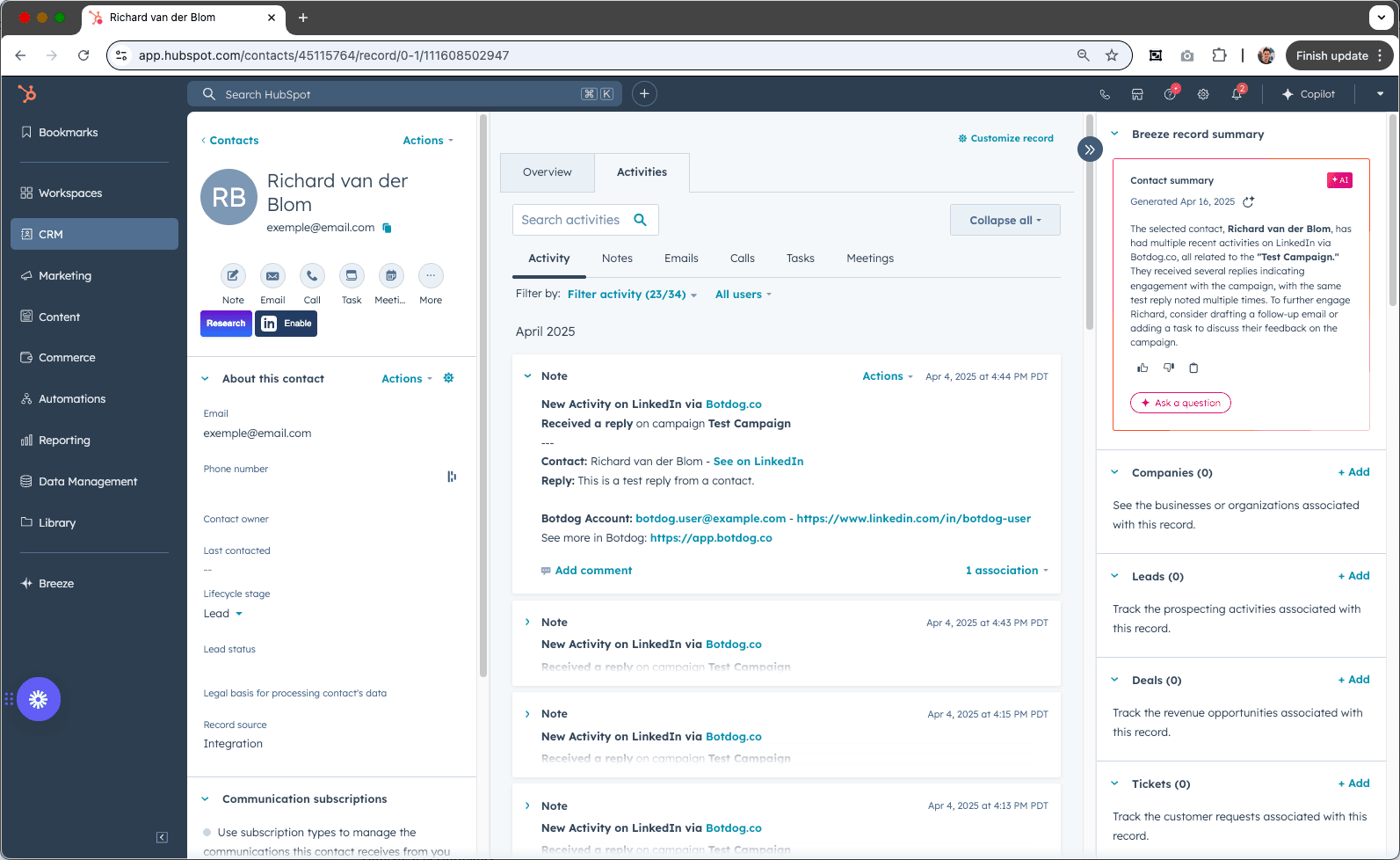
A prospect accepted. Someone replied. A campaign finished. Your daily limit was hit. Your LinkedIn account disconnected. Botdog pushes every one of these as a real-time webhook to any URL, or, with one paste, as a formatted message in a Slack channel, so your CRM stays current and your team hears about a reply before the prospect gets bored.
See the Difference
Stop polling. Start listening.
- ✕
Checking Botdog to know
Replies discovered hours later, when someone opens the app.
- ✕
CRM out of date
"Connected on LinkedIn" is a field nobody updates.
- ✕
Silent failures
Your account disconnects on Friday; you find out Monday.
- ✓
Eleven event types
Campaign started/completed; lead profile visited, invitation sent, accepted, withdrawn, message sent, replied, skipped; message received from outside campaigns; account disconnected; daily limit reached.
- ✓
Slack in one paste
Pick "Slack channel" as the destination and paste an Incoming Webhook URL. Events arrive with contact, company, campaign and an open-profile button.
- ✓
Scoped how you want
All campaigns, specific campaigns, or the connected account (for inbox messages that aren't part of any campaign).
Ready to transform your LinkedIn workflow?
Start Your 7-Day Free TrialNo credit card required • Cancel anytime
Webhooks You Can Debug
Delivery log
Each webhook has an events table with the lead, the campaign, the HTTP status your endpoint returned and retries — so "did it fire?" has an answer.
Pause, don't delete
Pause a webhook while you rebuild the receiver; resume when ready. Manage them in the app or through the API.
Beyond campaigns
Subscribe to messages from people outside your campaigns, inbound enquiries, list contacts you haven't sequenced yet, without ever getting a reply twice.
What people say about Botdog
Real stories. Real results.

Kate G.

I like that Botdog is very intuitive, making it easy even for someone who has never used it before or read any instructions to use it immediately. The initial setup was extremely easy, and it's well integrated with our other tools. It saves an enormous amount of time by automating LinkedIn outreach, allowing my sales team to take over only when a lead replies.

Valentin S.

Siva D.
Kathy L.
I like how easy it is to import and automate the request addition in Botdog. It's a simple search on the system and adding the link to Botdog is as simple as it gets. The initial setup was very simple; I just created a username and connected LinkedIn.
Mohamed A.
Botdog is straightforward and easy to use. It helps me get the tasks I need done - fast and without friction. I use it for product and service discovery, and it consistently leads me to insightful conversations with potential customers every week. It is still quite cheap in comparison with other tools.

Kamil J.
Toni H.
🚀 𝐈𝐟 𝐈 𝐖𝐞𝐫𝐞 𝐒𝐭𝐚𝐫𝐭𝐢𝐧𝐠 𝐌𝐲 𝐁𝐮𝐬𝐢𝐧𝐞𝐬𝐬 𝐓𝐨𝐝𝐚𝐲, I’d Skip Manual LinkedIn Engagement and Head Straight to 𝐁𝐨𝐭𝐝𝐨𝐠 💡

Eldad Stinbook
Cloud Evangelist | Infrastructu…
I subscribed -- in the seven-day free trial, I got several meetings booked. Much better response rate than my LinkedIn Sales Nav InMessages.

Greg Miller
Awesome team! Switching to bot dog - I've been using Dripify and it's wayyy too expensive for the value it provides.

Rasmus Chow
Botdog has completely changed how I approach LinkedIn outreach. I went from sending 10 connections a day manually to 100+ automated, and my response rate actually went up.
Sarah Johnson
VP Sales | SaaS
Best LinkedIn automation tool I've tried. Simple to set up, doesn't get your account flagged, and the team support is fantastic. Worth every penny.
Marco Bianchi
Founder | Agency
Kate G.
I like that Botdog is very intuitive, making it easy even for someone who has never used it before or read any instructions to use it immediately. The initial setup was extremely easy, and it's well integrated with our other tools. It saves an enormous amount of time by automating LinkedIn outreach, allowing my sales team to take over only when a lead replies.
Valentin S.
Siva D.
Kathy L.
I like how easy it is to import and automate the request addition in Botdog. It's a simple search on the system and adding the link to Botdog is as simple as it gets. The initial setup was very simple; I just created a username and connected LinkedIn.
Mohamed A.
Botdog is straightforward and easy to use. It helps me get the tasks I need done - fast and without friction. I use it for product and service discovery, and it consistently leads me to insightful conversations with potential customers every week. It is still quite cheap in comparison with other tools.
Kamil J.
Toni H.
🚀 𝐈𝐟 𝐈 𝐖𝐞𝐫𝐞 𝐒𝐭𝐚𝐫𝐭𝐢𝐧𝐠 𝐌𝐲 𝐁𝐮𝐬𝐢𝐧𝐞𝐬𝐬 𝐓𝐨𝐝𝐚𝐲, I’d Skip Manual LinkedIn Engagement and Head Straight to 𝐁𝐨𝐭𝐝𝐨𝐠 💡
Eldad Stinbook
Cloud Evangelist | Infrastructu…
I subscribed -- in the seven-day free trial, I got several meetings booked. Much better response rate than my LinkedIn Sales Nav InMessages.
Greg Miller
Awesome team! Switching to bot dog - I've been using Dripify and it's wayyy too expensive for the value it provides.
Rasmus Chow
Botdog has completely changed how I approach LinkedIn outreach. I went from sending 10 connections a day manually to 100+ automated, and my response rate actually went up.
Sarah Johnson
VP Sales | SaaS
Best LinkedIn automation tool I've tried. Simple to set up, doesn't get your account flagged, and the team support is fantastic. Worth every penny.
Marco Bianchi
Founder | Agency
Frequently Asked Questions About Webhooks & Slack Alerts
Get answers to common questions about this Botdog feature
Webhooks allow you to connect Botdog to other tools and automate your LinkedIn prospecting based on triggers. You can push LinkedIn activity data to your CRM, get real-time notifications in Slack when prospects engage, and build custom workflows using Zapier, Make, or n8n.
Webhooks let you automate manual tasks and connect Botdog to your entire tech stack. Get real-time notifications when prospects engage, so you can push these contacts to your CRM automatically. This helps you scale your outreach while maintaining a natural, human-like presence.
Botdog's automation is very safe when following our guidelines. We mimic human behavior by spreading messages and invitations over the day, only working during business hours so there's no weird activity at midnight. We use random delays between actions and respect LinkedIn's limits. We strongly recommend using a Premium LinkedIn Account (Sales Navigator, Recruiter, or Premium) for the best safety.
Set up webhooks to get real-time notifications when prospects engage. You can send alerts to Slack, update your CRM automatically, or trigger any workflow using Zapier, Make, or n8n. Webhooks fire instantly when prospects reply, so you never miss a hot lead.
Yes, use Botdog's webhooks to automatically push LinkedIn activity to your CRM. When prospects accept connections or reply, webhooks send that data to your CRM in real-time via Zapier. This eliminates manual data entry and ensures every LinkedIn lead is tracked.
Ready to Make the Jump?
Join thousands of professionals who are growing their network on autopilot. Start your journey today with our 7-day free trial.

Trusted by 5,000+ sales professionals worldwide
