Daily action limits now match your LinkedIn account type
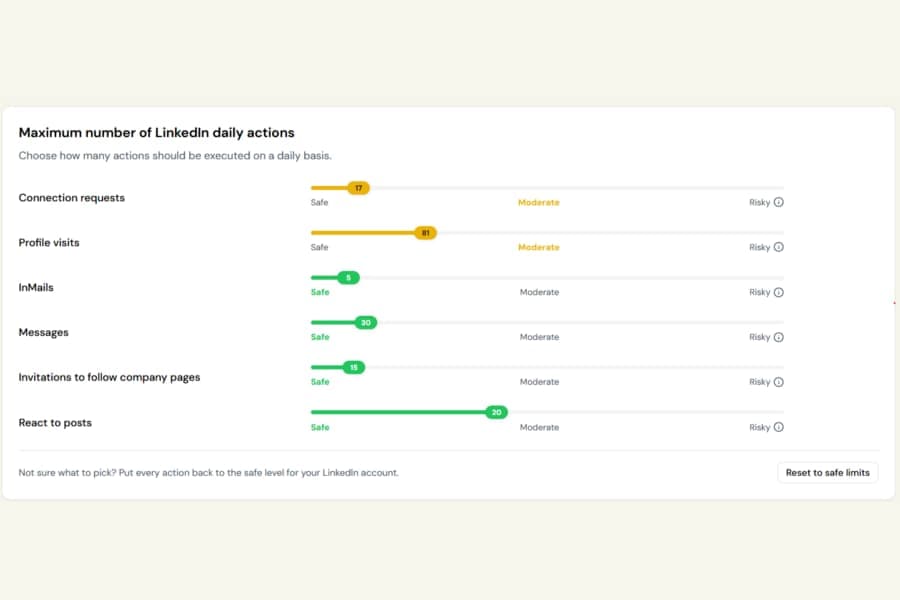
The Safe, Moderate, and Risky zones on your daily action sliders now adjust based on the type of LinkedIn account you have connected.
Previously, everyone saw the same guidance. Now the recommended ranges better reflect how LinkedIn behaves for different account types.
Different guidance for different LinkedIn accounts
Botdog now uses two sets of thresholds:
- Free LinkedIn accounts, with lower recommended limits because higher activity can attract attention sooner
- Premium, Sales Navigator, and Recruiter accounts, with higher recommended limits
Botdog detects your account type automatically, so there is nothing to configure.
Hover over the info icon next to any slider to see the exact Safe, Moderate, and Risky ranges for your own account.
One simple reset option
The three old preset buttons have been removed:
- For free, recent or cold accounts
- Slow premium account
- Fast premium account
They have been replaced with a single Reset to safe limits button.
Selecting it resets all six daily action limits to the recommended safe level for your connected account type.
Your existing limits have not changed
Botdog has not adjusted any limits you already set.
Your campaigns will continue running at the same rates as before.
The Safe, Moderate, and Risky zones are guidance only. They are not hard limits. If you choose a number in the Risky zone, Botdog will still use the number you selected.