New "Lead replied" notifications for replies from your contacts
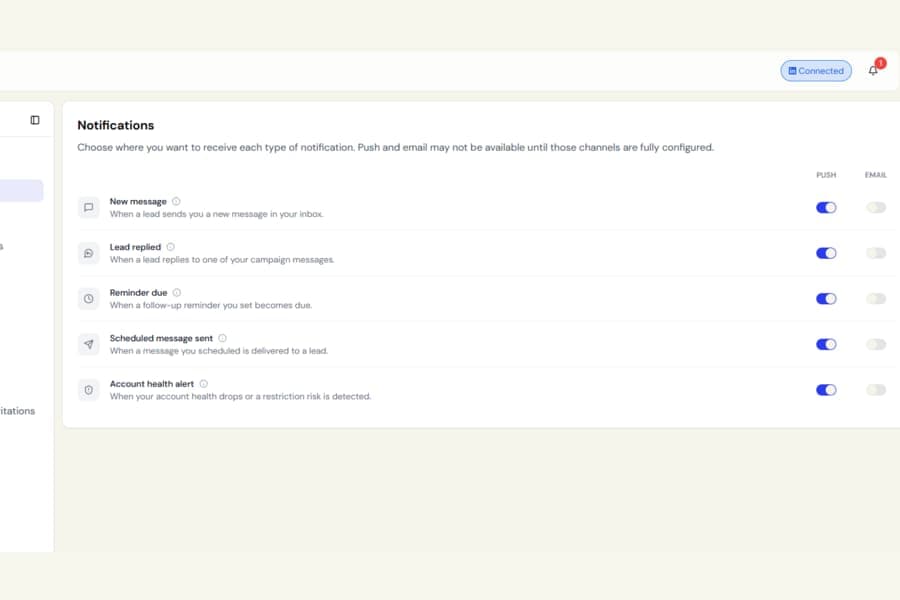
We have added a dedicated Lead replied notification, making it easier to spot replies from the contacts that matter most.
What was happening
Previously, replies from leads and general inbox messages were handled as the same type of notification.
If Show only imported contacts was enabled, replies from imported contacts could also fail to create a notification, which meant an important reply could be easy to miss.
What changed
Replies from:
- A campaign lead
- A 1st-degree connection you imported
now create a separate Lead replied notification.
General messages from people who are not your contacts will continue to appear as New message notifications.
The two notification types stay separate, and you will not receive duplicate alerts for the same reply.
Tapping a Lead replied notification takes you directly to that contact’s details.
Control it separately
Lead replied now has its own settings under Settings > Notifications.
It is enabled by default and can notify you through:
- Push notifications
- The in-app notification bell
- Email, if you choose to turn it on
You can also switch the notification off completely.
If you are already viewing a contact’s conversation when they reply, the conversation now refreshes automatically so you can see the new message right away.
If you do not use the inbox or imported contacts, your existing message notifications continue to work as before.