Profile Review: make your LinkedIn profile work for your goal
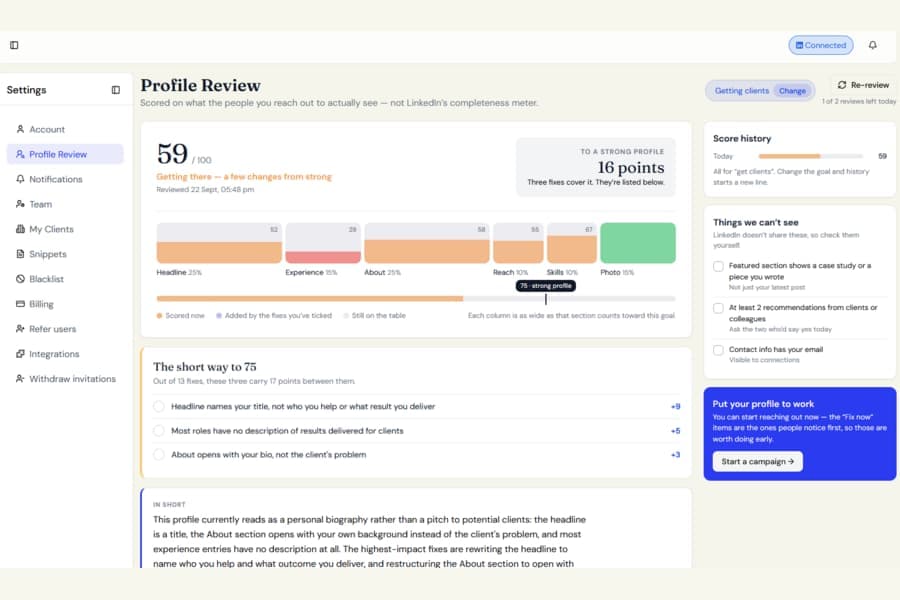
Every invitation you send can lead someone back to your LinkedIn profile. Botdog can now help you make sure they see the right message when they get there.
What is new
A new Profile Review page is available under Settings.
Start by choosing what you want your profile to help you achieve:
- Get clients
- Generate leads
- Recruit
- Meet investors
- Build an audience
You can also tell Botdog who you are trying to reach.
Botdog then reviews your LinkedIn profile and gives you a score out of 100 based on that goal.
The review looks at:
- Headline
- About section
- Experience
- Profile photo and banner
- Skills and credentials
- Reach signals such as Open Profile and your custom LinkedIn URL
Get a clear list of what to improve
Your recommendations are ordered by impact, so you can focus on the changes that matter most.
Each suggestion explains:
- What could be improved
- Why it matters for your selected goal
- What you can do next
For your Headline, About, and Experience sections, Botdog also drafts improved wording for you. Copy the text and paste it directly into LinkedIn when you are ready.
You can tick recommendations off as you complete them, then run the review again to see how your score changes.
Your previous reviews stay on the page, so you can track your progress over time.
Good to know
You can run up to four Profile Reviews per day.
If Botdog cannot reach LinkedIn or the written suggestions fail to generate, that attempt will not count toward your daily limit.
Botdog only reads your LinkedIn profile. It never makes changes to LinkedIn for you. You decide which suggestions to apply and update your profile yourself.
If LinkedIn is not connected yet, the page explains how Profile Review works and why improving your profile can be useful before starting your first campaign.