Reuse a campaign sequence with the new Duplicate Campaign option
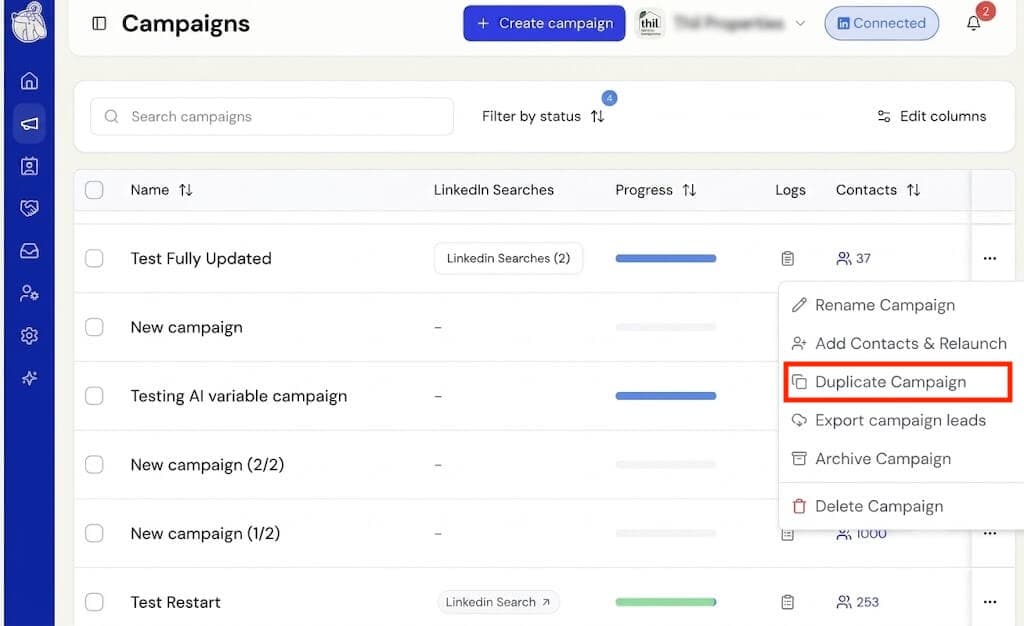
Found a sequence that works? You can now run it again on a new audience without rebuilding it from scratch.
Select the … menu on any campaign and choose Duplicate Campaign. You’ll land on the contact import step of a new campaign, ready for you to pick who to reach this time — the copy starts with no contacts, and the original’s contacts stay exactly where they are.
From there, you’ll see the full sequence copied over as-is. Adjust the messages, timings, or steps, or leave them untouched. Give the campaign a name (we’ll suggest one) and either launch it or save it as a draft.
Any campaign can be duplicated this way, including ones you’ve archived — so a campaign you shelved months ago is still a starting point for something new. The original is never affected.