Saving a template no longer publishes it - you choose when to share
You now decide when a sequence template is ready to be shared publicly.
Previously, saving a sequence as a template automatically sent it for review for the public template gallery. Now, saving a template keeps it private for your own use. Sharing it with others is a separate action you can take later.
Save templates for your own use
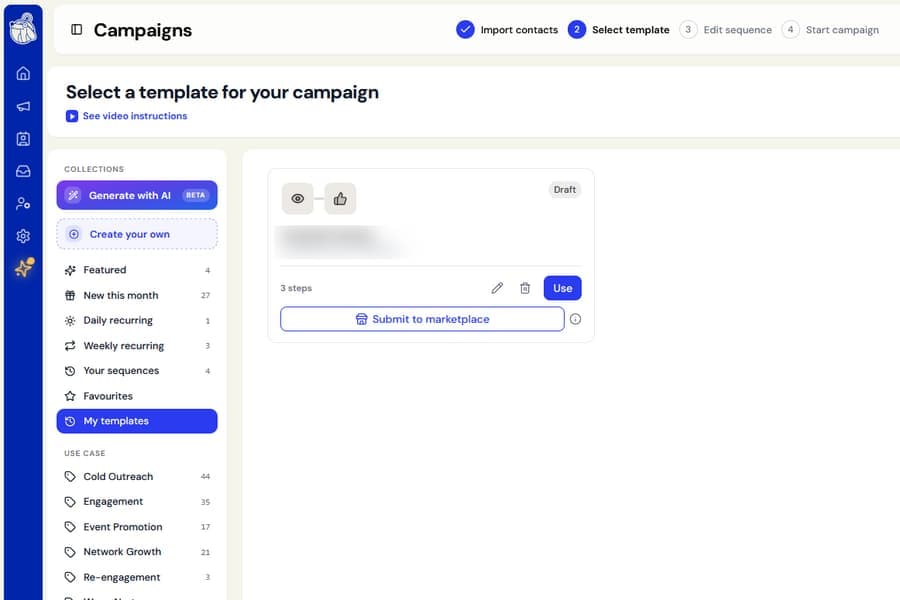
Selecting Save as Template now saves the template privately under My templates.
You can use it in your own campaigns right away. It will not be reviewed or added to the public gallery unless you choose to submit it.
Submit templates when you are ready
Each template under My templates now includes a Submit to marketplace button.
An info icon beside the button explains what happens next:
- The template goes through an automatic check
- The Botdog team reviews it
- Once approved, it appears in the public gallery under your name
- If it is not approved, you will see the reason and can update it before submitting again
Templates you submitted before this update are not affected. They keep their current gallery status.
Avoid saving exact duplicates
The Save as Template button is greyed out when your sequence is exactly the same as a template that already exists.
This only applies when both the steps and the messaging are identical. You can still reuse a familiar sequence structure with your own wording.
Change a step or message, and the button becomes available again.
Save the sequence exactly as it appears
Saving now captures the full sequence exactly as it appears on screen, including steps you are still completing.
The form only asks for:
- Name
- Tagline
- Description
Delete templates you no longer need
You can now delete any of your templates from My templates.
Botdog will ask for confirmation first. Campaigns already created from that template will keep their existing sequence.
Clearing a message now works correctly
We also fixed an issue where deleting a message did not always fully clear it.
Previously, the step card, character count, or Next button could still behave as though the deleted text was present. These now update correctly as soon as the message is cleared.