See when an invitation was withdrawn on your Contacts page
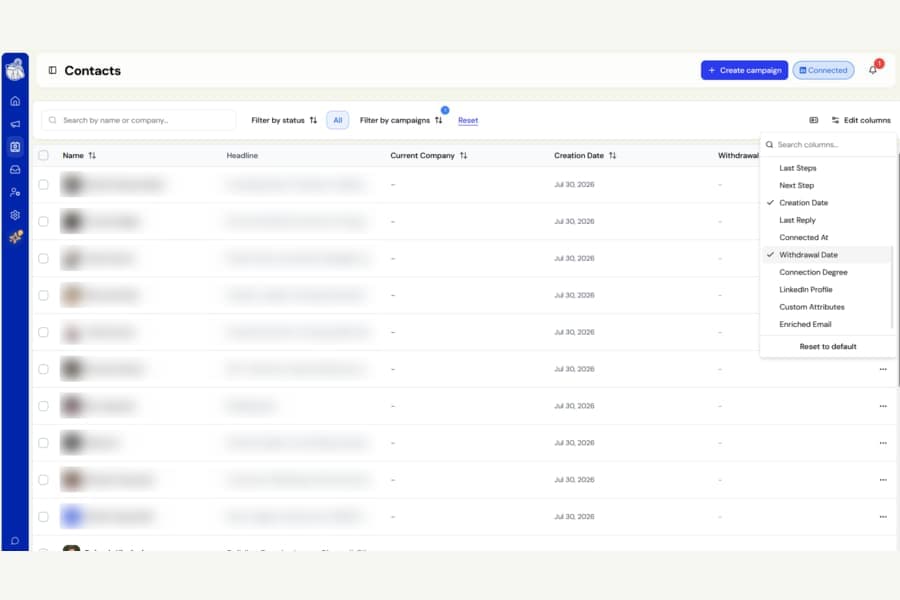
You can now add a Withdrawal Date column to your Contacts table, making it easier to see exactly when each connection invitation was withdrawn.
How to turn it on
Open Edit columns at the top-right of the Contacts page and enable Withdrawal Date.
The column is turned off by default, so your current Contacts view will not change unless you choose to add it.
Use it with the Withdrawn filter
The new column works especially well with the Withdrawn status filter.
You can:
- Filter your Contacts to show only withdrawn invitations
- Sort by Withdrawal Date
- See your oldest withdrawals first
This can help when deciding which contacts may be worth approaching again.
Good to know
Botdog only started recording the exact withdrawal date recently.
Contacts whose invitations were withdrawn before that will show a dash instead of a date. They will still appear normally under the Withdrawn filter.
When sorting, contacts with a recorded withdrawal date will always appear before those without one.