If you’re tired of wasting hours on manual LinkedIn search results, Sales Navigator gives you the tools to find quality leads fast. You can filter by job title, industry, and company size, so you’re not chasing the wrong people.
Pairing Sales Navigator’s targeting with Botdog’s automation turns prospecting into a faster, more organized process without losing that personal touch.
Botdog handles invitations, follow-ups, and message sequences while sticking to LinkedIn’s limits, so you get to focus on real conversations instead of repetitive busywork.
This guide covers the essentials, from setting up your Sales Navigator filters to integrating Botdog for smarter automation. You’ll see how to build targeted campaigns, manage outreach at scale, and keep messages relevant and timely.
The Challenges Of LinkedIn Prospecting Without Automation
Manual prospecting slows your sales process to a crawl. You’re stuck searching for leads, updating spreadsheets, and copying details into your CRM.
This repetitive work leads to errors and missed opportunities. For sales reps and sales managers, manual data entry eats up time that could go to talking with prospects or closing deals.
It’s tough for your entire team to stay aligned and share accurate info. Without automation, the sales cycle gets messy. One rep follows up too late, another loses track of potential leads entirely.
These small gaps pile up and make forecasting harder.
Sales professionals can burn out from the endless cycle of sending connection requests, tracking responses, and updating notes by hand.
Sales lead automation helps ensure consistency and frees up time for actual conversations.
Removing manual steps lets your sales team focus on strategy instead of routine work.
The Basics Of LinkedIn Sales Navigator For Prospecting

Image source: Pexels
LinkedIn Sales Navigator is a premium tool for sales pros who want to connect with qualified prospects. It offers advanced filters, lead recommendations, and real-time insights that go way beyond a standard LinkedIn search.
You can search by industry, company size, role, or geography to narrow your outreach efforts. This targeting helps you focus on decision-makers who actually fit your ideal customer profile.
Unlike LinkedIn Premium, Sales Navigator syncs with CRMs and sends alerts when leads change jobs or post updates. These signals let you reach out at the right time with something relevant.
Combine Sales Navigator with lead-generation software like Botdog to speed up prospecting, manage outreach efficiently and reduce manual work.
Using LinkedIn sales strategies with Botdog lets you build a list of target accounts, personalize messages, and track engagement in one workflow. It’s a lot easier to turn Sales Navigator data into real conversations that move deals along.
Key Features Of LinkedIn Sales Navigator
Sales Navigator's features help you generate leads faster.
Compared to basic LinkedIn search, its advanced capabilities let you filter and find leads by job title, industry, location, and company size so you can zero in on your target audience.
With Sales Nav, you can use Boolean search to combine keywords for more precise results. With lead recommendations and lead insights, you’ll spot who fits your ideal customer profile or buyer persona right away.
The lead builder helps you refine your lead search based on shared or mutual connections, making warmer introductions possible. Save top prospects as saved leads or organize them into lead lists and account lists.
LinkedIn Sales Navigator worth is clear, as these lists help you track updates such as job changes, company news, and buyer intent signals. Each lead’s profile and company page gives you info to guide your outreach.
Sales Navigator’s advanced features also include saved searches that remember your search history. You can revisit or update them whenever you want.
Monitor your social selling index to see how well you engage with leads and build trust. If you juggle many LinkedIn conversations, Botdog's inbox management tools help keep outreach organized while you focus on people.
Integrating Botdog With LinkedIn Sales Navigator
Botdog and LinkedIn Sales Navigator work together to help you find qualified leads faster, send personalized messages automatically, and track every interaction in one place.
It syncs your LinkedIn prospecting with your CRM, so your contact data is always current and your outreach stays consistent.
If you want a closer look at how automation helps daily outreach, check out these LinkedIn message automation insights.
What makes Botdog perfect for LinkedIn Sales Navigator
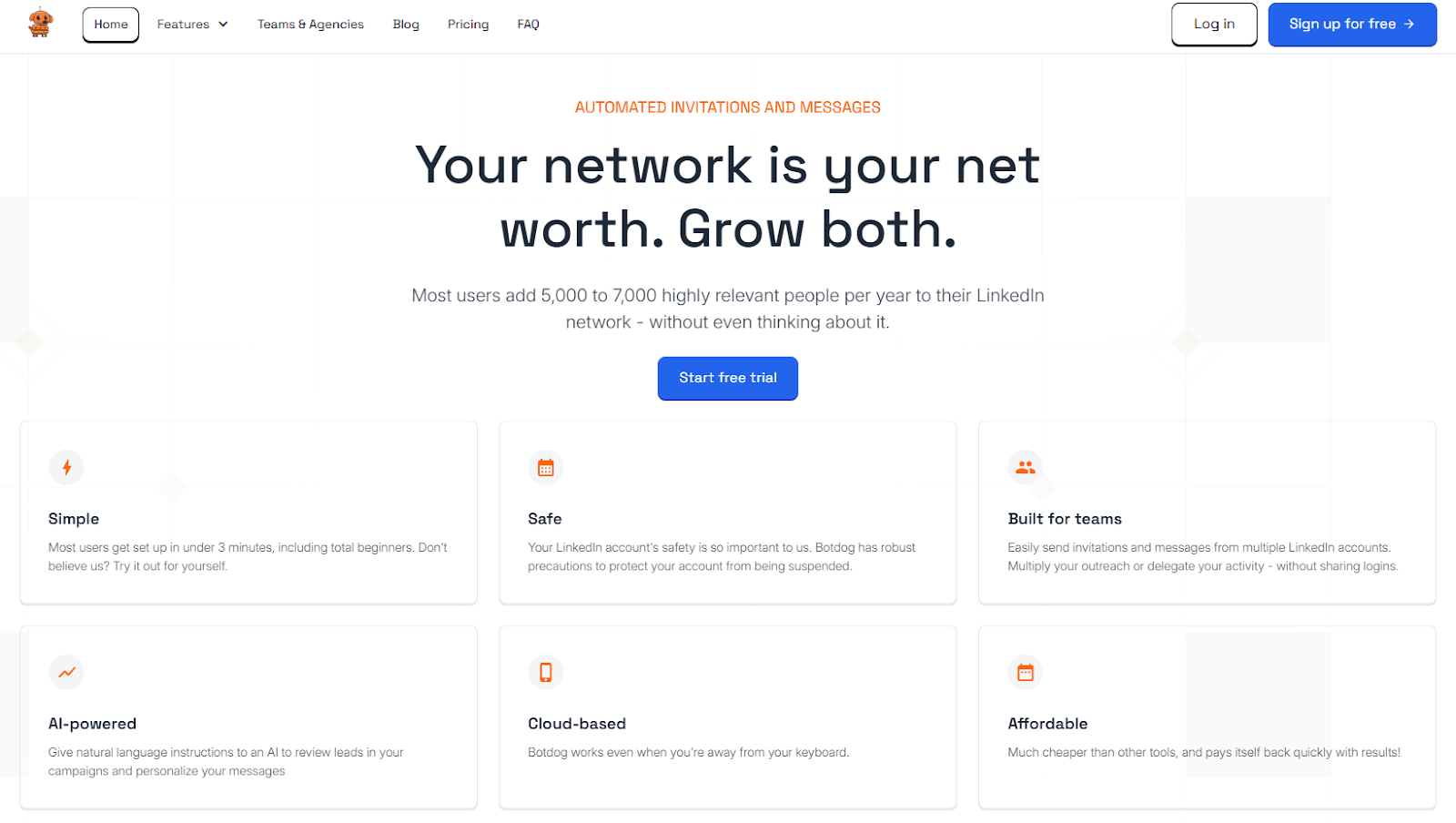
Botdog automates LinkedIn outreach while keeping your account safe from limits or spam flags. It connects directly with your LinkedIn Sales Navigator account, letting you import filtered lead lists and manage campaigns from one dashboard.
You can run several campaigns at once and assign tasks to teammates. Each campaign follows LinkedIn’s limits and mimics human behavior with random delays and scrolling.
Botdog’s cloud-based system means campaigns keep running even if you’re offline. It also syncs with tools like HubSpot and other CRMs, so your lead records are automatically updated.
Now, let's dive into the details.
Step 1: Identify and filter qualified leads with Sales Navigator
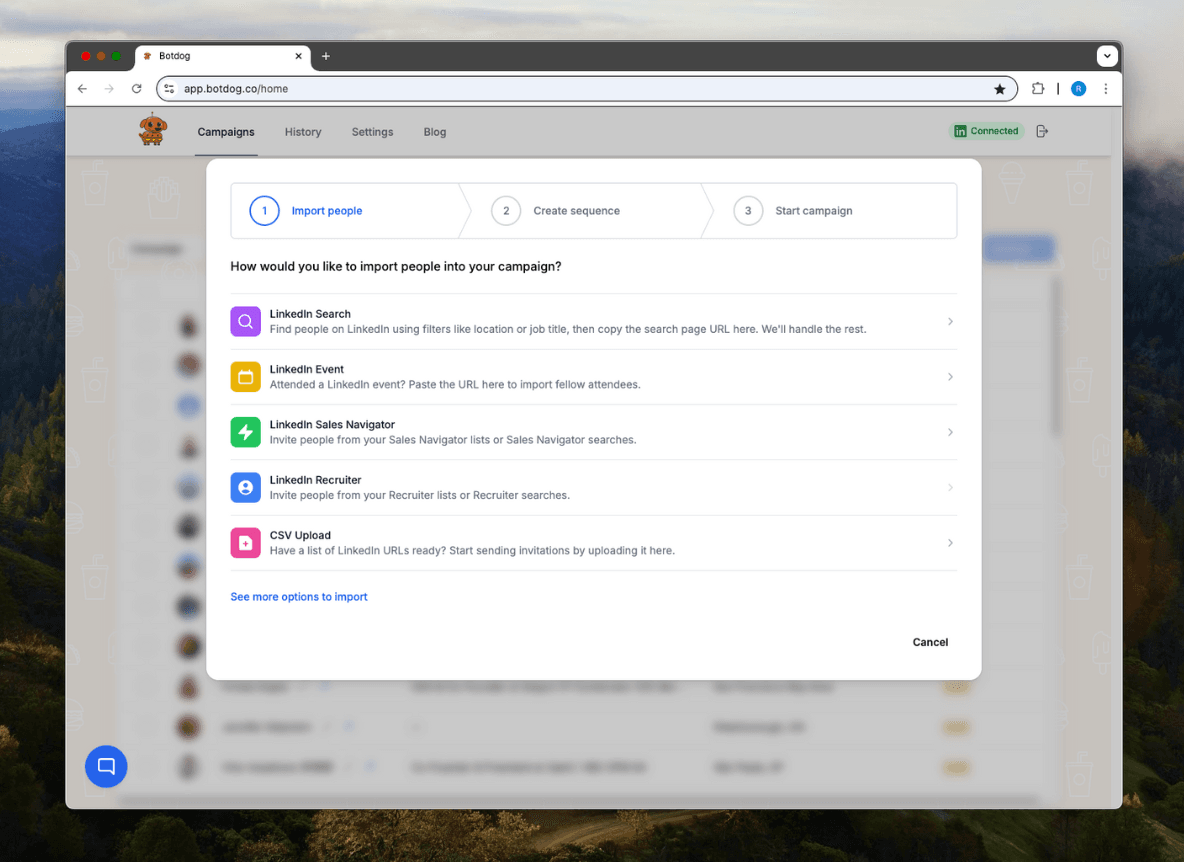
Start with the Sales Navigator interface and build a list of ideal prospects. Use filters like job title, company size, industry, or location to narrow your search.
Save these leads or export them straight into Botdog for campaign setup and automated sequences. Botdog lets you manage multiple lead lists at once, which comes in handy if you’re targeting different markets or roles.
You can also import data from LinkedIn Recruiter or Premium accounts. Once imported, Botdog organizes your contact data into clean lists, so you’re ready to start outreach without manual sorting.
This way, your campaigns focus on leads who actually match your business goals.
Step 2: Create personalized message sequences that convert
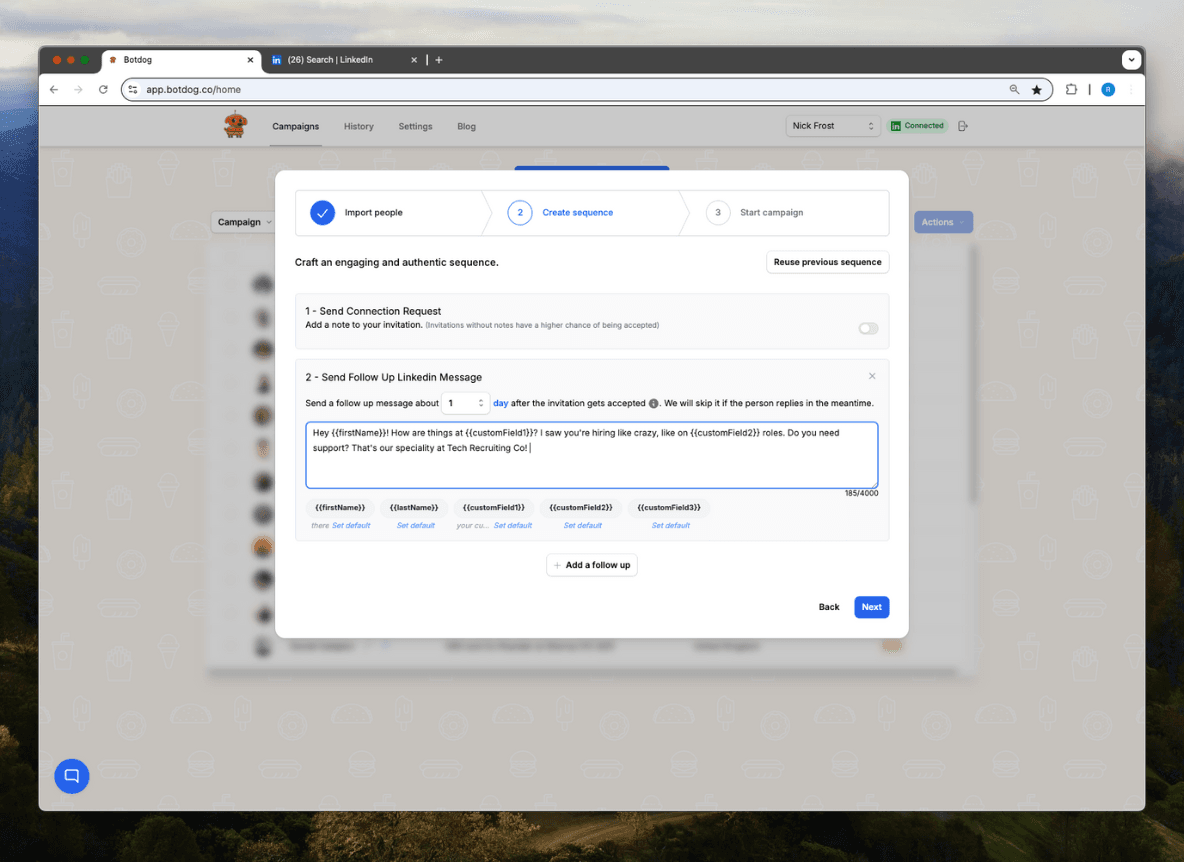
Personalization really drives engagement. Botdog lets you build dynamic message templates with variables like first name, company name, or job title.
These details make automated messages feel personal. You can design multi-step sequences for connection requests, introductions, and follow-ups.
Each step stops automatically when someone replies, so you won’t send duplicates. Keep your tone conversational and messages short. A simple structure works best:
- Greet the person by name
- Mention a shared interest or relevant detail
- End with a clear, low-pressure call to action
This approach bumps up response rates and builds genuine account engagement.
Step 3: Schedule follow-ups and automate engagement touchpoints
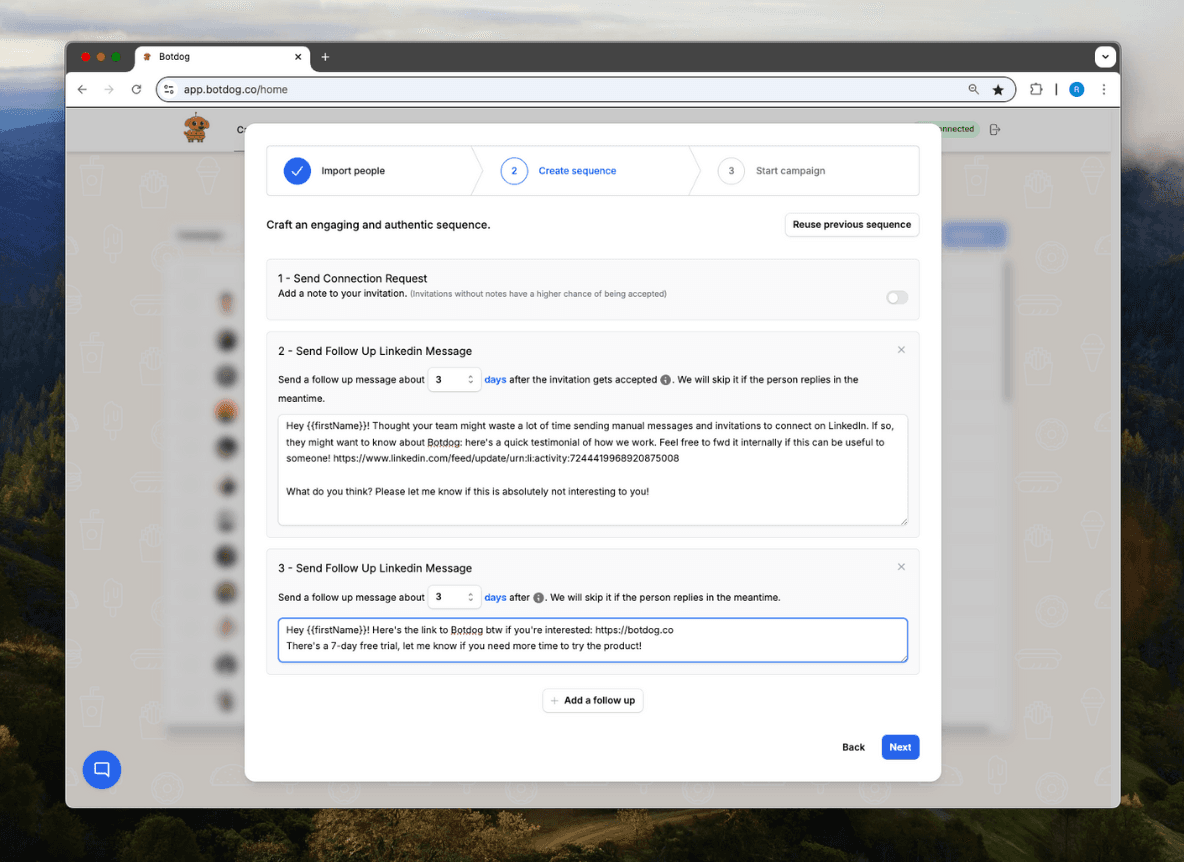
Botdog’s scheduling tools help you send messages when your audience is most active. You can set time zones, work hours, and random delays to keep things natural.
Follow-ups matter. You can schedule reminders or secondary messages a few days after your first contact. Botdog automatically pauses sequences when someone responds, so you don’t have to babysit it.
You can also plan and automate engagement touchpoints, like commenting on posts or liking updates, before messaging. It softens your approach and makes things feel more personal.
For more ways to improve lead nurturing, check out these lead generation automation tools.
Step 4: Track results and improve your outreach strategy
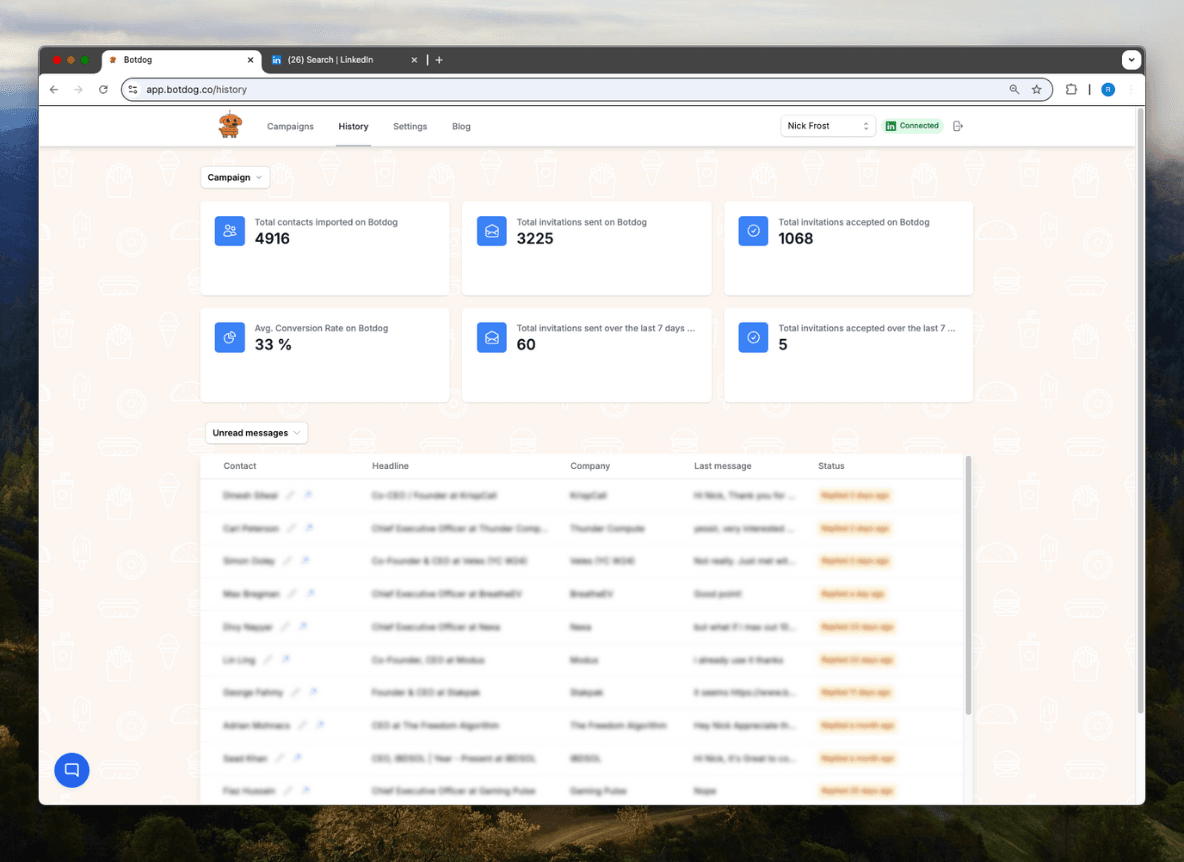
After your campaigns launch, Botdog tracks performance in real time. You’ll see metrics such as the number of imported contacts, the number of connection requests sent and accepted, and the average conversion rate.
Use this data to spot which templates and timing work best. Adjust your sequences or targeting filters as you go.
Botdog’s reports sync with your CRM, keeping account engagement data consistent everywhere. That makes it easier for your team to follow up and keep records straight.
Keep improving your campaigns, and you’ll see efficiency go up and steady growth.
Start a free trial to test these features and see how Botdog simplifies LinkedIn prospecting.
Advanced Prospecting Strategies With Botdog And Sales Navigator
Let Botdog sort these contacts into campaigns for warm leads and new leads. That way, you can tweak your approach for each group.
Dig into Sales Navigator for data insights so you can personalize your messages. Check out shared interests, company news, or recent posts before you reach out.
It’s a small thing, but mentioning something specific makes your outreach feel natural. Honestly, it’s the difference between getting ignored and getting a real conversation started.
Blend LinkedIn messages, emails, and connection requests into a single workflow. Botdog can handle the timing for you, so your communication stays consistent and less scattered.
If you use tools like those in sales automation tools, managing this process gets a lot easier.
Sync your automation with your CRM to keep track of leads and follow-ups. When your team sees every interaction in one spot, you’re way less likely to miss a chance—and your account based marketing strategy gets a boost.
Best Practices For Ethical Sales Navigator Automation
Stick to LinkedIn’s usage rules if you want to speed up your lead generation and keep your account safe. When you find relevant leads, sort them into campaigns for warm leads and new leads.
Pick sales automation tools that respect platform limits and actually help you engage, not spam. Don’t go overboard with automated messages or connection requests. That’s just good sense.
Balance automation with genuine relationship-building. Let Botdog handle the routine stuff, but keep your outreach personal where it counts.
Ask for a warm introduction through a shared connection instead of always sending cold messages. It feels friendlier, and people notice.
Keep your tone human and friendly, even in automated messages. Write short, clear notes that mention the person’s role, company, or something recent they did.
Don’t forget to review your templates and adjust them to fit each contact’s situation. For some practical tips, check out LinkedIn connection request best practices.
Test and measure what you’re doing. Track open rates, replies, and conversions to see if your approach is working.
Try A/B testing different message styles or timing, then tweak your process based on what actually gets results.
Conclusion on How to Use LinkedIn Sales Navigator for Prospecting
When you use LinkedIn Sales Navigator for prospecting, you already have a strong way to find and connect with the right leads. Pairing it with Botdog turns that process into a smooth, consistent system that saves you hours each week.
You can import contacts, set up message sequences, and track replies, all in one place. Botdog’s automation keeps your outreach steady while staying within LinkedIn’s limits.
If you’ve wondered whether LinkedIn Sales Navigator is worth the cost, adding Botdog makes the value clear. You get a powerful tool that helps you reach more prospects without losing the human touch.
Start your free trial today and see how Botdog helps you manage outreach, grow your network, and make the most of every Sales Navigator search.
FAQs on How to Use LinkedIn Sales Navigator for Prospecting
How to use LinkedIn Navigator for prospecting?
You use LinkedIn Sales Navigator to find and connect with potential customers. Start by setting filters like job title, industry, and company size.
Save leads and accounts so you can track updates and plan your outreach. Use alerts and insights to message people when they’re most active or have just changed roles.
What is the point of LinkedIn Sales Navigator?
The main goal is to help you identify and engage with decision-makers more efficiently. You get advanced search tools, lead recommendations, and CRM integration.
It lets you focus on the right prospects and manage your pipeline in one spot.
Can I use LinkedIn Sales Navigator to find a job?
Yes, but honestly, it’s made for sales pros. You can still use it to research companies, connect with hiring managers, and figure out team structures.
If you’re mainly job hunting, the regular LinkedIn platform might work better for you.
Is LinkedIn good for prospecting?
Yes. LinkedIn stands out as one of the best spots for B2B prospecting. You get to connect with professionals directly and spot shared interests right away.
It’s also easier to build trust through genuine engagement. If you use Sales Navigator, you’ll notice the whole process feels faster and way more targeted.